Managed vs Unmanaged Switch
Introduction
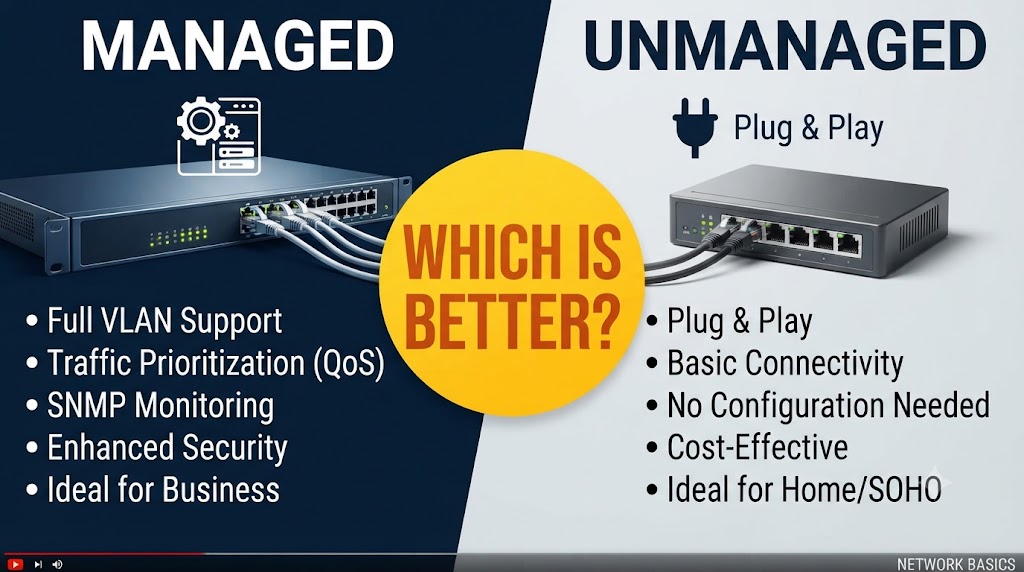
Managed and unmanaged switches are both used to connect multiple Ethernet devices within a wired network. Computers, IP cameras, printers, servers, access points, and other network devices can connect through either type of switch. The main difference is the level of control available to the network administrator. An unmanaged switch is designed to work with minimal configuration, while a managed switch provides settings that can be configured and monitored according to the requirements of the network.
An unmanaged switch is generally straightforward to install because it typically works as a plug-and-play device. A managed switch offers more advanced features such as VLANs, traffic monitoring, port management, and other network-control functions, depending on the model. These additional capabilities can be useful in larger networks or installations that require network segmentation and monitoring. The right choice depends on the size of the network, the devices being connected, the required features, and how much control is needed.
Quick Comparison Table
| Feature | Managed Switch | Unmanaged Switch |
|---|---|---|
| Basic Ethernet Connectivity | Yes | Yes |
| Configuration Required | Usually | Usually no |
| VLAN Support | Common | Generally no |
| Traffic Monitoring | Available on supported models | Limited or unavailable |
| Port Configuration | Extensive | Minimal |
| Network Segmentation | Supported | Generally not supported |
| Remote Management | Available on supported models | Generally unavailable |
| Installation | More involved | Simple |
| Cost | Generally higher | Generally lower |
| Best For | Larger or controlled networks | Basic networks |
Managed vs Unmanaged Switch: How They Work
Both switch types forward Ethernet traffic between connected devices.
An unmanaged switch normally operates automatically after it is connected. You plug in the Ethernet cables, connect the switch to the network, and it starts forwarding traffic.
A managed switch also forwards Ethernet traffic, but it provides a management interface that allows network settings to be configured.
Depending on the model, this management may be available through:
- Web interface
- Command-line interface
- Network management software
- Mobile or cloud management
The exact management options vary by manufacturer and model.
Managed vs Unmanaged Switch: Configuration
The biggest practical difference is configuration.
An unmanaged switch generally requires little or no configuration. This makes it convenient for users who simply want to add more Ethernet ports to an existing network.
A managed switch allows administrators to configure individual ports and other network features.
For example, a managed switch may allow you to:
- Enable or disable specific ports
- Configure VLANs
- Monitor port activity
- Set traffic priorities
- Check link status
- Configure security-related features
- Control certain network behaviors
This additional control becomes more useful as the network becomes larger or more complex.
Managed vs Unmanaged Switch: VLAN Support
VLANs (Virtual Local Area Networks) allow a physical network to be divided into separate logical networks.
For example, an office might use separate VLANs for:
- Employees
- CCTV cameras
- Guest Wi-Fi
- Servers
A managed switch can provide VLAN functionality on supported models.
This can help separate different types of network traffic without requiring completely separate physical switching hardware.
Basic unmanaged switches generally do not provide configurable VLAN functionality.
Why does this matter?
For a small home network, VLANs may not be necessary.
For an office, business, school, or larger CCTV installation, VLANs can become useful for organizing and separating network traffic.
Managed vs Unmanaged Switch: Network Monitoring
Managed switches can provide information about network activity.
Depending on the model, an administrator may be able to see:
- Port status
- Link speed
- Traffic statistics
- Errors
- Connected devices
- Bandwidth utilization
This information can help when troubleshooting network problems.
An unmanaged switch generally provides little or no user-accessible monitoring information.
If a network develops a connectivity or performance problem, the additional information from a managed switch can make troubleshooting easier.
Managed vs Unmanaged Switch for CCTV
Both managed and unmanaged switches can be used in IP CCTV networks.
For a small CCTV system with a few cameras, an unmanaged switch can be sufficient when the network design is simple.
A managed switch becomes more useful when the CCTV network is larger or needs additional control.
For example, a managed switch may allow you to:
- Place CCTV cameras on a separate VLAN
- Monitor individual camera ports
- Check network traffic
- Disable unused ports
- Manage network connections
If the switch also supports PoE, it can provide power to compatible IP cameras in addition to network connectivity.
Important point
A managed switch does not automatically improve camera image quality.
CCTV performance also depends on camera resolution, bitrate, recording equipment, network bandwidth, cabling, and configuration.
Managed vs Unmanaged Switch: Security
Managed switches can provide additional network-control and security-related features, depending on the model.
These may include features such as:
- Port security
- VLAN segmentation
- Access control mechanisms
- Storm control
- Monitoring and logging
An unmanaged switch provides much less control over individual ports and network traffic.
For networks containing sensitive devices or multiple groups of users, the additional controls of a managed switch can be useful.
However, security depends on the complete network design, including routers, firewalls, Wi-Fi configuration, endpoint devices, and administrator practices.
Managed vs Unmanaged Switch: Performance
Both managed and unmanaged switches can provide high-speed Ethernet.
You can find both types with:
- Fast Ethernet
- Gigabit Ethernet
- 2.5 Gigabit Ethernet
- 10 Gigabit Ethernet
Therefore, managed does not automatically mean faster.
The actual network speed depends on the switch model and the Ethernet standards supported by the connected devices.
A Gigabit unmanaged switch can provide a Gigabit connection just as a Gigabit managed switch can.
The major difference is the level of control rather than basic switching speed.
Managed vs Unmanaged Switch: Ease of Installation
An unmanaged switch is generally easier to install.
For a simple network, you can connect the Ethernet cables and start using the switch without configuring network settings.
A managed switch requires more knowledge if you want to take advantage of its advanced features.
Incorrect configuration can also cause connectivity problems.
For users who only need additional Ethernet ports, an unmanaged switch can therefore be simpler.
For users who need network control, the configuration options of a managed switch can be valuable.
Managed vs Unmanaged Switch: Cost
Unmanaged switches are generally less expensive than managed switches with comparable port counts and speeds.
Managed switches cost more because they include additional hardware and software capabilities for configuration and monitoring.
However, the additional cost can be justified when features such as VLANs, monitoring, traffic management, and port controls are required.
For a basic network, paying for features you will not use may not provide a practical benefit.
Managed vs Unmanaged Switch: Reliability
Both types can provide reliable network connectivity when properly selected and installed.
An unmanaged switch has fewer configurable settings, which also means there are fewer configuration-related issues to manage.
A managed switch provides greater control but requires appropriate configuration and maintenance.
For larger networks, the ability to monitor ports and troubleshoot network conditions can be valuable when maintaining reliability.
Managed vs Unmanaged Switch for Home Networks
An unmanaged switch is often sufficient for a basic home network.
For example, if you have:
- Router
- Desktop computer
- Smart TV
- Gaming console
- Printer
- Network storage
and simply need additional Ethernet ports, an unmanaged switch may provide the required connectivity.
A managed switch may be useful for advanced home networks where you want VLANs, network monitoring, traffic management, or more detailed control.
Managed vs Unmanaged Switch for Business Networks
Business networks often have more complex requirements.
A managed switch can provide tools for separating departments, monitoring traffic, controlling ports, and organizing network devices.
For example, a business could separate office computers, guest Wi-Fi, CCTV cameras, and other equipment into different VLANs where supported by the network design.
An unmanaged switch can still be useful for simple sections of a business network where advanced configuration is unnecessary.
Managed vs Unmanaged Switch: Which One Should You Choose?
Choose a managed switch if:
- You need VLAN support.
- You want to monitor network traffic.
- You need greater control over individual ports.
- You are managing a larger or more complex network.
- You need network segmentation.
- You want additional management and troubleshooting features.
- Your CCTV or business network requires more control.
Choose an unmanaged switch if:
- You only need additional Ethernet ports.
- You want simple plug-and-play installation.
- Your network is small and straightforward.
- You do not need VLANs or advanced monitoring.
- You want to keep the initial switch cost lower.
Overall Winner: Depends on Your Needs
A managed switch and an unmanaged switch are designed for different levels of network management.
An unmanaged switch is suitable when simplicity is the priority and the network only needs basic Ethernet connectivity.
A managed switch provides substantially more configuration and monitoring capabilities when the network requires segmentation, traffic management, or detailed control.
For a simple home network, an unmanaged switch can be sufficient. For a larger business, advanced home, or more complex CCTV network, the additional management capabilities of a managed switch can be useful.
Conclusion
Managed and unmanaged switches perform the same fundamental task of connecting Ethernet devices, but they differ significantly in how much control they provide. An unmanaged switch offers straightforward plug-and-play connectivity, while a managed switch can provide VLANs, monitoring, port configuration, traffic management, and other features depending on the model.
The right choice depends on what your network actually requires. If you simply need more Ethernet ports, an unmanaged switch can be enough. If you need to divide the network, monitor traffic, manage individual ports, or troubleshoot a larger installation, a managed switch provides more control.
Before purchasing, check the switch’s port speed, port count, PoE capability if required, VLAN features, management method, and other specifications that match your network requirements.
Disclaimer
Managed switch features vary significantly between models and manufacturers. Not every managed switch supports the same VLAN, security, monitoring, traffic-management, or remote-management functions. Network performance also depends on connected devices, cabling, configuration, and other network equipment. Always check the manufacturer’s specifications before purchasing or installing a switch.