ONT vs Modem
Introduction
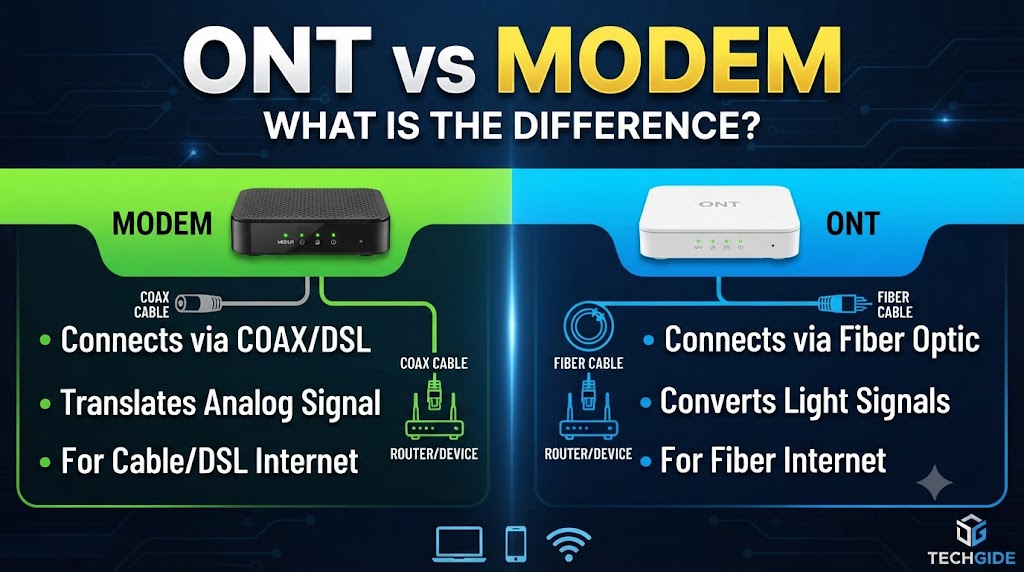
An ONT and a modem are both networking devices used to connect users to internet services, but they are designed for different types of connections. An ONT (Optical Network Terminal) is commonly used with fiber-optic internet to convert optical signals from the fiber network into electrical Ethernet signals. A traditional modem, depending on the type, converts signals used by technologies such as cable or DSL into a form that networking equipment can use.
The main difference between an ONT and a modem is the access technology they support. An ONT is specifically associated with fiber-optic networks, while a modem is generally associated with non-fiber access technologies such as cable or DSL. Some modern devices combine the functions of an ONT, router, Wi-Fi access point, and other networking components, so the exact equipment supplied by an ISP can vary.
Quick Comparison Table
| Feature | ONT | Modem |
|---|---|---|
| Full Form | Optical Network Terminal | Modulator-Demodulator |
| Commonly Used With | Fiber Internet | Cable, DSL and other compatible connections |
| Main Function | Converts optical network signals to usable network signals | Converts signals between the access network and local network |
| Connection to ISP | Fiber-optic cable | Depends on technology |
| Converts Optical Signal | Yes | No, traditional modem does not |
| Ethernet Output | Common | Common |
| Wi-Fi | Usually not built into a basic ONT | Usually not built into a basic modem |
| Router Function | May be combined into an ISP gateway | May be combined into a modem-router gateway |
| Technology | Fiber-optic | Cable/DSL and other access technologies |
What Is an ONT?
ONT stands for Optical Network Terminal. It is a device used in fiber-optic internet networks.
The ONT receives optical signals from the ISP’s fiber network and converts them into electrical signals that can be used by Ethernet networking equipment.
A typical fiber setup may look like:
Fiber cable → ONT → Router → Wi-Fi/Ethernet devices
Depending on the ISP and equipment, the ONT may be a separate device or may be integrated into a larger gateway.
What Does an ONT Do?
An ONT can:
- Receive signals from a fiber-optic network
- Convert optical signals into electrical network signals
- Provide Ethernet connectivity
- Communicate with the ISP’s optical access network
- Sometimes provide additional telephone or other service interfaces
An ONT is therefore an important part of many fiber-to-the-home connections.
What Is a Modem?
Modem is short for modulator-demodulator.
A modem is designed to communicate with the access network used by a particular internet technology. For example, a cable modem communicates with a cable provider’s network, while a DSL modem communicates with a DSL network.
A simplified setup can look like:
Cable/DSL line → Modem → Router → Devices
A modem does not necessarily provide Wi-Fi or routing. Those functions may be handled by a separate router or by a combined modem-router gateway.
ONT vs Modem: Main Differences
1. Internet Technology
The biggest difference is the type of access network they connect to.
An ONT is used with fiber-optic internet.
A modem is commonly used with technologies such as cable or DSL, depending on the modem type.
Practical meaning: You cannot normally replace a fiber ONT with a standard cable or DSL modem.
2. Signal Conversion
An ONT converts optical signals from the fiber network into electrical network signals.
A traditional modem performs signal conversion appropriate to its access technology.
Practical meaning: The device has to match the physical network provided by the ISP.
3. Fiber Connection
An ONT normally has a fiber connection coming from the ISP’s network.
A cable modem normally connects through coaxial cable, while a DSL modem connects through a telephone-line-based connection.
Practical meaning: Looking at the incoming connection type is one of the easiest ways to understand whether you need an ONT or a modem.
4. Ethernet Connection
Both an ONT and a modem can provide an Ethernet connection to a router or another networking device.
For example:
Fiber:
Fiber → ONT → Ethernet → Router
Cable:
Coaxial cable → Cable Modem → Ethernet → Router
The exact ports and features depend on the equipment.
5. Wi-Fi
A basic ONT does not necessarily provide Wi-Fi.
A basic modem also does not necessarily provide Wi-Fi.
However, ISPs commonly provide combined gateway devices that include multiple functions such as:
- ONT/modem
- Router
- Wi-Fi access point
- Ethernet switch
Practical meaning: Don’t assume that an ONT or modem automatically means Wi-Fi is built in. Check the specific device.
ONT vs Modem: Which Is Better?
Neither device is universally better because they are designed for different internet technologies.
If your ISP provides fiber internet, an ONT is generally the device used to terminate the fiber connection.
If your ISP provides cable or DSL internet, a compatible modem is generally used for that access technology.
So the choice is usually determined by the type of internet connection available rather than personal preference.
ONT vs Modem for Fiber Internet
For a typical fiber connection:
Fiber cable → ONT → Router → Devices
The ONT handles the connection between the optical fiber network and the local Ethernet network.
A separate router can then handle functions such as:
- NAT
- DHCP
- Wi-Fi
- Firewall
- Local network management
Some ISP-provided fiber gateways combine the ONT and router functions into one device.
Can an ONT Replace a Modem?
An ONT can perform a similar network access termination role in a fiber network, but it is not simply a universal replacement for every type of modem.
The two devices are designed for different access technologies.
For example:
- Fiber network → ONT
- Cable network → Cable modem
- DSL network → DSL modem
The correct device depends on the ISP’s network.
Can a Modem Replace an ONT?
A standard cable or DSL modem cannot normally replace an ONT on a fiber connection.
Fiber networks use optical communication and require compatible optical network equipment.
In some ISP deployments, an optical module or optical network terminal may be integrated into a gateway, but the underlying fiber-network function is still required.
ONT vs Modem: What About a Router?
An ONT and modem are not necessarily routers.
A router manages the local network and can provide functions such as:
- NAT
- DHCP
- Firewall
- Wi-Fi
- Ethernet connectivity
A common setup is:
Fiber:
Fiber → ONT → Router → Devices
Cable:
Coaxial cable → Modem → Router → Devices
Some ISP gateways combine these functions into a single box.
ONT vs Modem: Key Takeaway
The easiest way to remember the difference is:
ONT = commonly used to connect a fiber-optic network to your local network.
Modem = commonly used to connect cable, DSL, or another compatible access network to your local network.
Neither is universally better. The correct device depends primarily on the internet technology provided by your ISP.
Conclusion
An ONT and a modem both serve as important connection points between an ISP’s access network and a customer’s local network, but they work with different technologies. An ONT is commonly used for fiber-optic internet and converts optical signals into network signals that can be delivered through Ethernet. A modem is commonly used with cable or DSL connections and performs the signal conversion required by those technologies.
If you have fiber internet, your connection will typically use an ONT or an integrated fiber gateway. If you have cable or DSL internet, a compatible modem is normally used. In either case, a separate router may be required unless the ISP provides a combined gateway.
Disclaimer
The exact equipment and terminology used by ISPs can vary. Some providers combine ONT, modem, router, Wi-Fi, and other functions into a single gateway device. Always check your ISP’s supported equipment and network requirements before replacing or purchasing networking hardware.