Gaming Monitor vs TV
Introduction
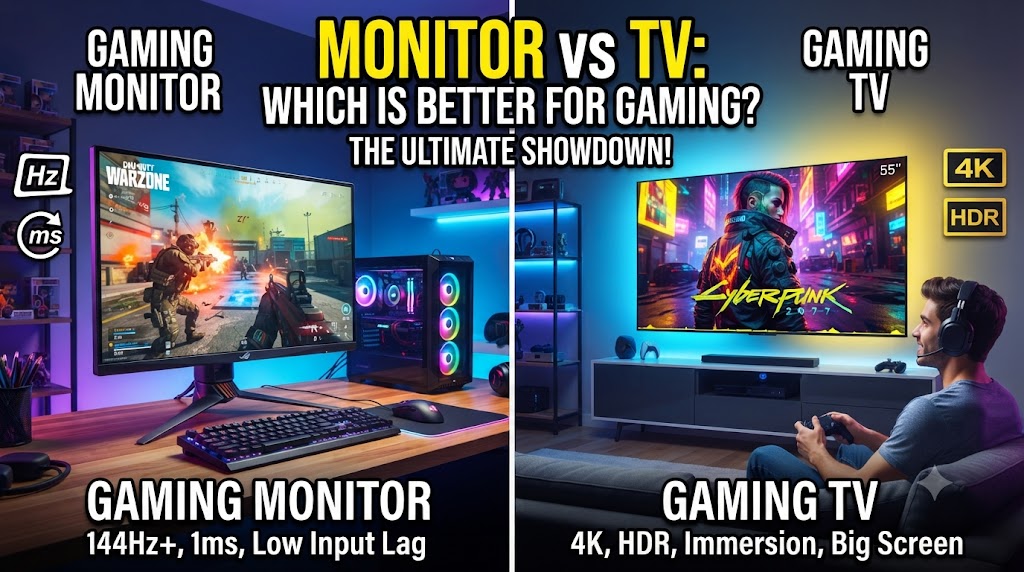
A gaming monitor and a TV can both provide an excellent gaming experience, but they are designed with different priorities. Gaming monitors generally focus on fast response times, low input lag, high refresh rates, and features designed around PC gaming. TVs, on the other hand, usually offer much larger screens and are designed for gaming as well as movies, streaming, and regular television content. (Display Ninja)
The better choice depends mainly on how you play. A competitive PC gamer may benefit from a high-refresh-rate monitor, while someone who plays console games from a sofa may prefer a large TV. Modern gaming TVs can also offer features such as 120Hz or higher refresh rates, HDMI 2.1, and VRR, so the difference is not simply “monitor good, TV bad.” (RTINGS.com)
Quick Comparison Table
| Feature | Gaming Monitor | TV |
|---|---|---|
| Main purpose | Gaming and PC use | TV, movies and gaming |
| Screen size | Usually smaller | Usually larger |
| Refresh rates | Often very high | Commonly 60Hz–120Hz+, depending on model |
| Input lag | Usually very low | Can be low in Game Mode |
| Response time | Usually faster | Varies considerably by model |
| Resolution | 1080p, 1440p, 4K and more | Mainly 4K on modern models |
| VRR | Common on gaming models | Available on many modern gaming TVs |
| HDMI 2.1 | Available on many models | Available on many newer models |
| Competitive gaming | Strong choice | Depends on model |
| Console gaming | Excellent | Excellent with the right model |
| Large-screen gaming | Limited compared with TVs | Major advantage |
| Movies and streaming | Basic to good | Major advantage |
Gaming Monitor vs TV: Refresh Rate
Refresh rate describes how many times a display can update its image each second. A 60Hz display refreshes 60 times per second, while a 120Hz display can refresh twice as often.
Gaming monitors are widely available with high refresh rates such as 144Hz, 165Hz, 240Hz and beyond. This can be particularly useful in competitive games where players benefit from smoother motion and quick visual updates.
Modern gaming TVs can also offer 120Hz or higher refresh rates. Some newer models support even higher refresh rates, but this is highly model-dependent. (RTINGS.com)
Advantage for high-refresh competitive gaming: Gaming Monitor
Gaming Monitor vs TV: Input Lag
Input lag is the delay between an input from a controller, keyboard or mouse and the corresponding action appearing on the display.
Low input lag is particularly important in competitive games because delayed responses can make controls feel less immediate. Modern gaming monitors generally have very low input lag, while many TVs can also achieve low input lag when their dedicated Game Mode is enabled. (Display Ninja)
Therefore, the display’s actual test results matter more than simply choosing “monitor” or “TV.”
Advantage: Gaming Monitor, generally
Gaming Monitor vs TV: Response Time
Response time describes how quickly pixels can change from one color to another. Slow pixel transitions can produce visible ghosting or blur behind moving objects. (Display Ninja)
Gaming monitors are generally designed with fast pixel response in mind, especially models aimed at competitive gaming.
TVs vary considerably. Some modern gaming TVs have very quick response times, while others can show noticeable motion blur even when they offer high refresh rates. RTINGS testing of current TVs shows that high refresh rate and HDMI 2.1 support do not automatically guarantee fast pixel transitions. (RTINGS.com)
Advantage: Gaming Monitor, generally
Gaming Monitor vs TV: Screen Size
This is one of the biggest differences.
Gaming monitors are commonly available in relatively compact desktop sizes, making them suitable for sitting close to the screen. TVs are designed to be viewed from farther away and are available in much larger sizes.
A large TV can make single-player games, racing games, sports games and local multiplayer gaming more immersive.
A monitor is usually easier to use at a desk because its size is more suitable for close viewing.
Advantage for large-screen gaming: TV
Gaming Monitor vs TV: Resolution
Both categories offer a wide range of resolutions.
Gaming monitors can be found in 1080p, 1440p and 4K configurations, while modern TVs are predominantly 4K.
The important point is to match resolution with the gaming hardware. A powerful gaming PC can take advantage of a high-resolution, high-refresh-rate monitor, while a console gamer may find a 4K TV more convenient.
Result: Tie
Gaming Monitor vs TV: VRR
Variable Refresh Rate, or VRR, allows the display’s refresh rate to adjust to the frame rate being produced by the gaming device. This can help reduce screen tearing and provide smoother gameplay.
Many modern gaming monitors support technologies such as FreeSync or G-SYNC-compatible VRR.
Modern gaming TVs can also support VRR. Some models provide HDMI 2.1 bandwidth and VRR for high-resolution, high-refresh-rate console and PC gaming. (RTINGS.com)
Result: Depends on the model
Gaming Monitor vs TV: HDMI 2.1
HDMI 2.1 can be important for modern consoles and gaming PCs because it supports higher bandwidth than older HDMI standards.
Some gaming monitors include HDMI 2.1, while many newer gaming TVs also offer HDMI 2.1 ports. For example, RTINGS testing shows modern TVs supporting 4K at 120Hz or higher together with VRR through HDMI 2.1. (RTINGS.com)
However, not every TV or monitor has HDMI 2.1, so the exact model specifications should always be checked.
Result: Depends on the model
Gaming Monitor vs TV: PC Gaming
For a traditional desktop PC gaming setup, a gaming monitor is usually more convenient.
It can offer a smaller screen size, high refresh rates, fast response times, low input lag and features specifically designed around PC gaming.
A monitor also works naturally with a keyboard and mouse at a desk.
A TV can still be used successfully as a PC gaming display, particularly when the user wants a large 4K screen. However, its size and viewing distance need to suit the setup.
Advantage for desktop PC gaming: Gaming Monitor
Gaming Monitor vs TV: Console Gaming
A TV can be particularly convenient for console gaming because consoles are commonly used with a controller from a sofa or other seating position.
A good modern gaming TV can provide 4K resolution, 120Hz refresh rate, VRR, HDMI 2.1 and low input lag. These features allow compatible consoles to take advantage of higher frame rates and smoother gameplay. (RTINGS.com)
A gaming monitor can also work very well with consoles, especially if the user prefers a desk setup.
Advantage for traditional living-room console gaming: TV
Gaming Monitor vs TV: HDR and Picture Quality
TVs often put considerable emphasis on cinematic picture quality, HDR and large-screen viewing.
Some high-end TVs can produce excellent HDR images with strong brightness, contrast and deep blacks. OLED TVs can provide particularly strong contrast because individual pixels can turn off completely.
Gaming monitors can also offer HDR, but performance varies considerably between models. Some premium gaming monitors provide excellent HDR, while cheaper models may offer more limited HDR performance.
Advantage: Depends on the model
Gaming Monitor vs TV: Movies and Entertainment
A TV is designed for more than gaming.
It can be used for television channels, streaming services, movies, sports and gaming, usually with built-in smart-TV features.
A gaming monitor can display movies and streaming content through a connected PC or other device, but it generally does not provide the same all-in-one entertainment experience.
Advantage: TV
Gaming Monitor vs TV: Which Is Better for Competitive Gaming?
Competitive gaming places greater importance on low input lag, fast response times and high refresh rates.
Gaming monitors are available with extremely high refresh rates and are specifically designed around fast-paced PC gaming. This makes them particularly suitable for competitive titles where players want quick visual updates.
A TV can also perform well if it has low input lag, a high native refresh rate and fast pixel response. However, these characteristics vary more widely between TV models. (Display Ninja)
Advantage: Gaming Monitor
Gaming Monitor vs TV: Which Is Better for Casual Gaming?
For casual gaming, the difference becomes less important.
If you mainly play single-player games, sports games, racing games or adventure titles, a large TV can provide an enjoyable experience, particularly from a comfortable viewing distance.
A gaming monitor remains a strong choice if the PC is located on a desk and you also use the same screen for work or other computer tasks.
Result: Depends on the setup
Gaming Monitor vs TV: Which One Should You Choose?
Choose a Gaming Monitor if:
- You mainly play PC games at a desk.
- You play competitive games.
- You want a very high refresh rate.
- You want fast pixel response.
- You use a keyboard and mouse.
- You want a compact desktop display.
- You also need the screen for regular PC work.
Choose a TV if:
- You primarily play from a sofa.
- You want a large screen.
- You mainly play console games.
- You also watch movies and streaming services.
- You prefer a 4K display for entertainment and gaming.
- You want one screen for gaming and general entertainment.
Overall Result: Depends on Your Gaming Setup
There is no universal winner between a gaming monitor and a TV because they are designed around different use cases.
A gaming monitor is generally better suited to competitive PC gaming, high refresh rates, desktop setups and fast response times.
A TV is generally better suited to large-screen console gaming, living-room setups and combined gaming and entertainment.
A modern gaming TV can overlap significantly with gaming monitors, so specifications such as input lag, response time, refresh rate, VRR and HDMI 2.1 should be checked before making a purchase.
Conclusion
A gaming monitor and TV can both be excellent gaming displays, but the right choice depends on how and where you play. For competitive PC gaming at a desk, a gaming monitor usually provides the more gaming-focused feature set.
For console gaming from a sofa, large-screen gaming and mixed entertainment use, a suitable gaming TV can be a better fit. The most important step is to compare the specifications of the actual models rather than assuming every monitor or TV performs the same way.
Disclaimer
Display performance varies significantly between individual monitor and TV models. Refresh rate, input lag, response time, VRR support, HDR performance and HDMI features can differ even between products in the same category. Prices and specifications may also change over time, so check the current specifications and local price before purchasing.