Ethernet vs Wi-Fi
Introduction
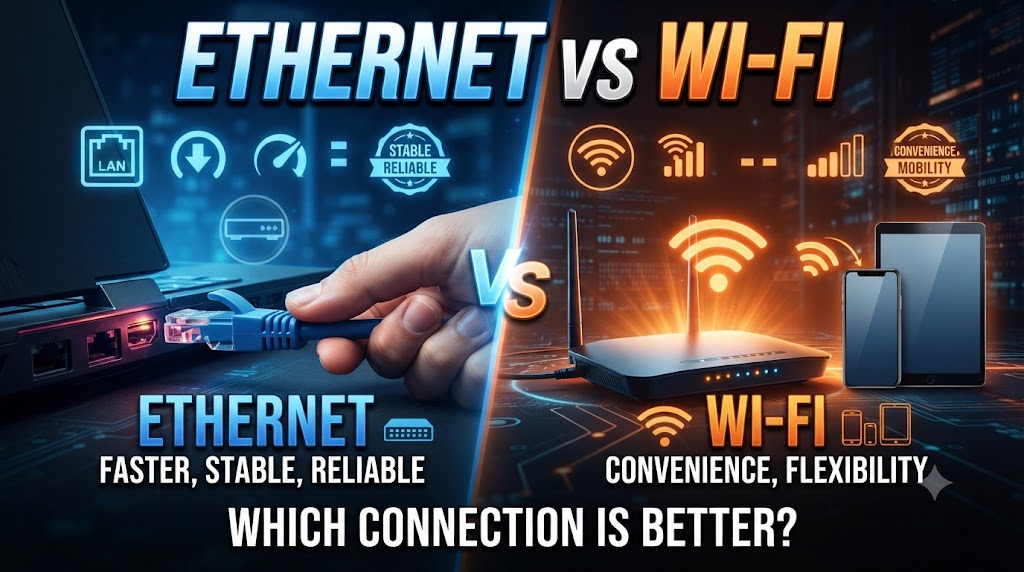
Ethernet and Wi-Fi are two common ways to connect devices to a network and the internet. Ethernet vs Wi-Fi is mainly a comparison between wired and wireless connectivity. Ethernet uses a physical network cable, while Wi-Fi connects compatible devices wirelessly through a router or access point.
Both connections can provide fast and reliable networking, but they have different advantages. Ethernet is generally useful when stable performance and low latency are important, while Wi-Fi provides greater mobility and easier connection for devices without network cables. The right option depends on your device, location, usage, and networking requirements.
Quick Comparison Table
| Feature | Ethernet | Wi-Fi |
|---|---|---|
| Connection | Wired | Wireless |
| Cable Required | Yes | No |
| Mobility | Limited by cable | High |
| Latency | Usually lower | Usually higher and more variable |
| Reliability | Generally very stable | Can be affected by interference |
| Speed | Depends on Ethernet standard and equipment | Depends on Wi-Fi standard, signal, and environment |
| Interference | Less affected by wireless interference | Can be affected by wireless interference |
| Setup | Requires cabling | Usually easier for new devices |
| Security | Physical access and network security both matter | Requires proper wireless security |
| Best For | Gaming, desktops, servers, CCTV | Phones, laptops, smart devices |
What Is Ethernet?
Ethernet is a wired networking technology that connects devices using network cables.
A common Ethernet connection uses an RJ45 connector and twisted-pair network cable. A computer, NVR, CCTV camera, printer, or other compatible device can connect to a router or network switch through Ethernet.
For example:
Computer → Ethernet Cable → Router/Switch
Because the connection is physical, the device does not depend on wireless signal strength.
What Is Wi-Fi?
Wi-Fi is a wireless networking technology that allows compatible devices to connect without a physical network cable.
A typical setup looks like this:
Phone/Laptop → Wi-Fi → Router/Access Point
Wi-Fi is especially convenient for smartphones, laptops, tablets, smart TVs, and other devices that frequently move around.
The actual performance depends on factors such as Wi-Fi generation, router capability, distance, walls, interference, and the connected device.
Ethernet vs Wi-Fi: Main Differences
1. Wired vs Wireless Connection
The biggest difference in Ethernet vs Wi-Fi is how the device connects.
Ethernet requires a physical cable between the device and network equipment.
Wi-Fi uses radio communication between the device and a router or access point.
Practical meaning:
Ethernet is useful for fixed devices, while Wi-Fi is more convenient for devices that need mobility.
2. Speed
Ethernet can provide high network speeds, depending on the Ethernet standard, network equipment, and cable.
Wi-Fi can also provide high speeds, especially with newer Wi-Fi standards and suitable equipment. However, actual wireless performance can vary more because of distance, obstacles, interference, and the number of connected devices.
Result:
Neither connection has one fixed speed. The equipment and environment determine the actual performance.
3. Latency
Latency is the delay involved in sending data across a network.
Ethernet generally provides more consistent and low-latency communication because it uses a direct wired connection.
Wi-Fi can also provide low latency, but wireless conditions can introduce additional variation.
Practical meaning:
For applications where consistent response time matters, Ethernet can be a strong choice.
4. Reliability
Ethernet connections are generally stable because they are not affected by typical wireless interference.
Wi-Fi performance can be affected by:
- Distance from the router
- Walls and floors
- Other wireless networks
- Electronic interference
- Network congestion
- Router and device limitations
Therefore, Wi-Fi can be reliable when properly designed, but its performance may vary more depending on the environment.
5. Mobility
This is where Wi-Fi has a major practical advantage.
A Wi-Fi-connected laptop or smartphone can move around within the usable wireless coverage area without disconnecting simply because a cable cannot reach the new position.
With Ethernet, the device normally remains connected to the cable.
Winner for mobility: Wi-Fi
6. Installation
Ethernet requires network cables to be installed between devices and network equipment.
For a few devices, this may be simple. However, cabling an entire home or office can require additional work.
Wi-Fi usually requires less physical cabling because devices connect wirelessly.
Result:
Wi-Fi is generally more convenient when running cables is difficult.
7. Security
Ethernet and Wi-Fi both require proper network security.
With Ethernet, a physical connection is required, but unauthorized users who gain physical network access may still pose a security risk.
Wi-Fi uses wireless communication, so strong encryption, a secure password, updated equipment, and appropriate network settings are important.
Therefore, neither should be considered automatically secure simply because it is wired or wireless.
Ethernet vs Wi-Fi for Gaming
Gaming can benefit from a stable, low-latency connection.
Ethernet is often preferred for gaming PCs and consoles because the wired connection can provide consistent network performance.
Wi-Fi can also work well, particularly when the router is close to the gaming device and the wireless environment is good.
Result:
For a fixed gaming device, Ethernet is often the practical choice when running a cable is possible.
Ethernet vs Wi-Fi for CCTV
Ethernet is widely useful for IP CCTV systems because cameras can receive network connectivity through physical cables. Some network setups can also deliver power and data through a suitable Ethernet connection using PoE.
Wi-Fi cameras can be useful where running network cables is difficult. However, wireless signal quality becomes an important factor.
For a stable fixed CCTV installation, wired networking can simplify reliability. For locations where cabling is difficult, Wi-Fi can provide greater installation flexibility.
Ethernet vs Wi-Fi for Home Use
A home network can use both technologies at the same time.
For example:
Ethernet:
- Desktop PC
- Gaming console
- Smart TV
- NVR
- Network storage
Wi-Fi:
- Smartphones
- Tablets
- Laptops
- Smart speakers
- Other wireless devices
There is no requirement to use only Ethernet or only Wi-Fi. A combination is often the most practical solution.
Ethernet vs Wi-Fi for Office Use
Offices commonly use both wired and wireless networking.
Ethernet can be useful for desktops, printers, servers, switches, access points, and other fixed equipment.
Wi-Fi is convenient for laptops, smartphones, visitors, and employees who move between work areas.
A properly designed office network can therefore use Ethernet for fixed connections and Wi-Fi for mobility.
Which Connection Should You Choose?
Choose Ethernet when you need:
- Stable connectivity
- Consistent performance
- Low latency
- A connection for a fixed device
- Gaming connectivity
- Network storage access
- Wired CCTV networking
- Desktop or server networking
Choose Wi-Fi when you need:
- Mobility
- Easy connection for multiple devices
- Fewer cables
- Convenient smartphone and laptop connectivity
- Flexible device placement
- Wireless smart-home devices
Can You Use Ethernet and Wi-Fi Together?
Yes. In fact, many modern networks use both.
For example:
Internet → Router → Ethernet + Wi-Fi
The router can provide wired Ethernet ports while also providing wireless Wi-Fi connectivity.
This allows fixed devices to use Ethernet while mobile devices use Wi-Fi.
Overall Result
There is no universal winner in Ethernet vs Wi-Fi.
Ethernet is generally better suited to fixed devices where stable, consistent, low-latency connectivity is important.
Wi-Fi is better suited to devices where mobility, convenience, and flexible placement are more important.
For many homes and offices, the most practical solution is to use both Ethernet and Wi-Fi together.
Conclusion
Ethernet and Wi-Fi serve different networking needs. Ethernet provides a wired connection that can offer stable and consistent performance, while Wi-Fi provides the convenience of wireless connectivity and mobility.
If you are connecting a desktop PC, gaming console, NVR, server, or other fixed device, Ethernet can be a practical option. For smartphones, laptops, tablets, and mobile devices, Wi-Fi provides much greater convenience.
Therefore, the best choice depends on how and where you use the device rather than simply choosing one technology for every situation.
Disclaimer
Actual Ethernet and Wi-Fi speed, latency, reliability, range, and performance can vary depending on the router, network equipment, cable, Wi-Fi standard, device capabilities, distance, walls, interference, network traffic, and configuration. Product features and prices may also change over time.