LAN vs WAN
Introduction
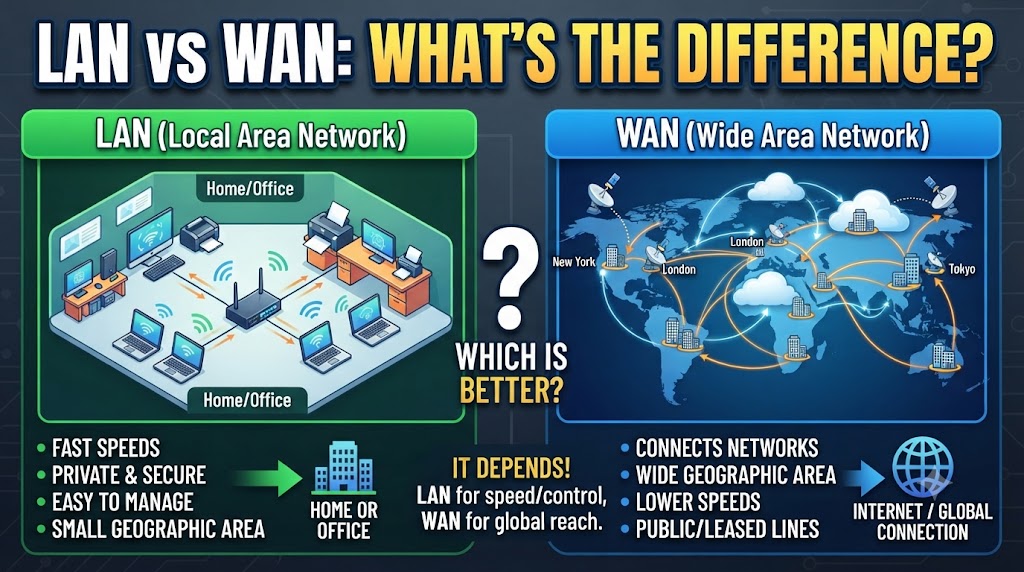
LAN and WAN are two common types of computer networks, but they are designed for different purposes. LAN vs WAN mainly depends on the area a network covers and how devices are connected. LAN is generally used within a limited location such as a home, office, school, shop, or building, while WAN connects networks across larger geographical areas.
The main difference is that LAN focuses on local communication, whereas WAN is designed to connect networks over cities, countries, or even continents. Understanding the difference can help you choose the right network setup for internet access, file sharing, CCTV, offices, and other networking requirements.
Quick Comparison Table
| Feature | LAN | WAN |
|---|---|---|
| Full Form | Local Area Network | Wide Area Network |
| Coverage | Small/local area | Large geographical area |
| Common Use | Home, office, school | Branches, cities, countries |
| Speed | Usually higher within the local network | Usually depends on the WAN connection |
| Latency | Generally lower | Generally higher |
| Control | Usually controlled by one organization/user | May involve multiple networks/providers |
| Infrastructure | Ethernet, Wi-Fi, switches, access points | Internet, leased lines, VPNs, carrier networks |
| Cost | Usually lower for a small network | Can be higher depending on the connection |
| Example | Office computers connected to a switch | Company branches connected across cities |
What Is LAN?
LAN stands for Local Area Network. It connects computers, smartphones, printers, CCTV devices, servers, and other networking devices within a limited geographical area.
For example, the computers and printers inside a shop can be connected through a LAN. Similarly, devices connected to the same router or network in a home are part of a local network.
How Does LAN Work?
A LAN can use wired Ethernet connections, wireless Wi-Fi connections, or both.
A typical office LAN may include:
- Router
- Network switch
- Ethernet cables
- Wi-Fi access points
- Computers
- Printers
- CCTV cameras
- Network storage
A switch can connect multiple wired devices, while Wi-Fi allows compatible devices to connect wirelessly.
What Is WAN?
WAN stands for Wide Area Network. It connects networks over a much larger geographical area.
A WAN can connect offices located in different cities or countries. The internet is the most familiar example of a very large WAN.
For example, if a company has offices in Delhi, Mumbai, and Bengaluru and connects their networks together, the connection between those locations can be considered a WAN.
How Does WAN Work?
WAN connections can use different technologies depending on the requirement. These may include internet connections, leased lines, VPNs, cellular networks, and other telecommunications services.
A WAN allows users in different locations to communicate and access shared systems or resources.
LAN vs WAN: Main Differences
1. Coverage Area
LAN covers a relatively small area, such as a room, building, shop, or office.
WAN covers much larger areas and can connect networks located in different cities, states, countries, or continents.
Practical meaning:
For devices inside one building, LAN is normally the relevant network type. For connecting separate locations, WAN becomes important.
2. Speed and Latency
LAN connections generally provide fast communication between nearby devices, especially when using Ethernet.
WAN performance depends heavily on the connection between locations. Distance, network technology, service provider, and internet conditions can affect speed and latency.
Practical meaning:
Moving a large file between computers on a local Ethernet network can be faster than transferring the same file between distant locations through a WAN.
3. Ownership and Control
A LAN is commonly managed by a single person, business, school, or organization.
A WAN can involve multiple service providers, network operators, or organizations, particularly when it uses telecommunications infrastructure or the public internet.
Practical meaning:
LAN management is usually more straightforward because the organization has greater control over its local equipment.
4. Infrastructure
LAN commonly uses:
- Ethernet cables
- Switches
- Routers
- Wi-Fi access points
WAN can involve:
- Internet connections
- Leased lines
- VPNs
- Cellular networks
- Carrier networks
- Routers and other WAN equipment
Therefore, WAN infrastructure can be more complex than a small LAN.
5. Cost
A basic LAN can often be created with relatively affordable networking equipment.
WAN costs vary considerably. Connecting distant offices may require dedicated services, additional equipment, or higher-performance connections.
Result:
LAN is generally simpler and less expensive for local networking, while WAN costs depend on the distance, technology, bandwidth, and service used.
6. Security
A LAN can be protected using local security controls such as network passwords, firewalls, access controls, VLANs, and device permissions.
WAN security depends on how the WAN is designed. When sensitive information travels between locations over networks such as the internet, technologies such as VPNs and encryption can be used.
Security therefore depends not only on whether a network is LAN or WAN but also on its configuration.
LAN vs WAN for Home Networks
Most home networks are primarily LANs.
For example:
Internet → Router → Wi-Fi/Ethernet → Devices
Your laptop, smartphone, smart TV, printer, and other connected devices can communicate through the local network.
The router also provides the connection between your home LAN and the wider internet.
So, your home network can contain a LAN while also using a WAN connection to access internet services.
LAN vs WAN for Business Networks
A small office may only need a LAN to connect computers, printers, servers, and CCTV cameras.
A larger company with multiple offices may use both.
For example:
Office LAN → WAN → Another Office LAN
Each office has its own local network, while the WAN connects the separate locations.
This arrangement allows organizations to share selected resources and communicate between branches.
LAN vs WAN for CCTV
CCTV systems can use LAN when cameras and recording equipment are located within the same local network.
For example, IP cameras can connect to a network switch, which then connects to an NVR.
WAN becomes useful when cameras or NVR systems need to be accessed from another location.
For example, a business owner may view cameras installed at one location from another city through a suitable network or internet connection.
Result:
LAN is commonly used for local CCTV communication, while WAN can provide connectivity between distant locations.
LAN vs WAN for File Sharing
LAN is generally suitable for sharing files between computers and network storage within the same location.
WAN can also support file access between different locations, but performance depends on the WAN connection and the systems being used.
For large amounts of local data, a properly configured LAN can provide efficient communication between devices.
Which Is Better: LAN or WAN?
There is no single winner because LAN and WAN solve different networking problems.
Choose LAN when you need to:
- Connect devices in a home or office
- Share printers locally
- Connect computers to a local server
- Use network storage
- Connect local CCTV equipment
- Transfer data between nearby devices
Choose WAN when you need to:
- Connect different offices
- Communicate between distant locations
- Access business systems from another location
- Connect geographically separated networks
- Use internet-based connectivity between locations
Overall Result
LAN vs WAN is not really a competition between two alternatives.
LAN is designed for local networking within a limited area, while WAN connects networks over larger geographical distances.
For a home, shop, or single office, LAN is usually the network structure you work with locally. For businesses or organizations with multiple locations, WAN can connect those separate LANs.
Conclusion
LAN and WAN have different roles in computer networking. LAN provides local connectivity between nearby devices, while WAN connects networks across larger distances.
Therefore, the right choice depends on your requirement. If you only need communication between devices in one location, LAN is the appropriate network type. If you need to connect separate locations, WAN is designed for that purpose.
Disclaimer
Network speed, latency, coverage, reliability, security, and costs can vary depending on the networking equipment, connection type, service provider, distance, configuration, and number of connected devices. Specific features and prices may also change over time.