
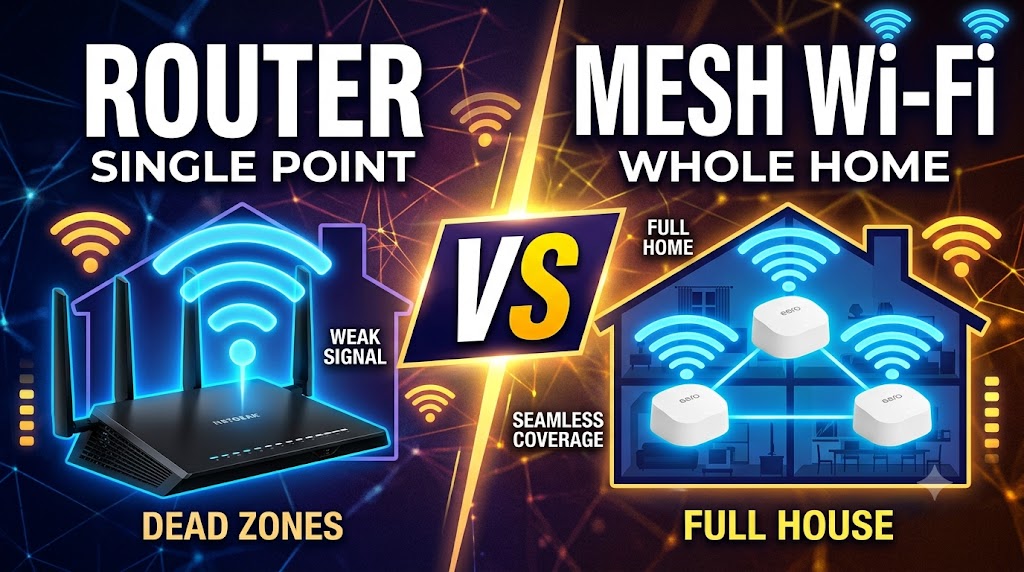
Wi-Fi Router vs Mesh Wi-Fi
Introduction
A Wi-Fi router is the traditional way to create a wireless network in a home, office, or small business. A single router connects to the internet service and broadcasts Wi-Fi from one location. Modern routers can support multiple Wi-Fi bands, Ethernet connections, security features, and many connected devices. For a small or medium-sized home where one centrally placed router can provide reliable coverage, a conventional Wi-Fi router can be a simple and cost-effective solution. Its performance depends on the router hardware, Wi-Fi standard, placement, walls, interference, connected devices, and internet connection.
Mesh Wi-Fi is designed to provide wider and more consistent wireless coverage by using multiple coordinated devices called nodes. One main node connects to the modem or internet access device, while additional nodes are placed in other areas of the home. These nodes work together as one network and can use wireless or Ethernet backhaul to communicate. Mesh systems are particularly useful when a single router leaves dead zones or weak-signal areas, such as large, multi-story, or unusually shaped homes.
Quick Comparison Table
| Feature | Wi-Fi Router | Mesh Wi-Fi |
|---|---|---|
| Basic Design | Single main device | Multiple coordinated nodes |
| Coverage | Best from one central location | Designed for broader whole-home coverage |
| Dead-Zone Reduction | Limited by router placement and range | Better for areas a single router cannot cover |
| Speed Near Main Device | Often excellent | Can also be excellent |
| Speed in Distant Areas | Can decrease with distance | Usually more consistent when properly configured |
| Roaming | Basic router setup | Designed for coordinated roaming |
| Expandability | Limited unless using additional equipment | Nodes can usually be added within the compatible system |
| Backhaul | Not applicable between nodes | Wireless or Ethernet, depending on system |
| Setup | Usually simpler | More hardware and placement required |
| Cost | Usually lower for one-device coverage | Usually higher because multiple nodes may be required |
| Best For | Small/medium homes and simple networks | Large homes and Wi-Fi dead zones |
| Overall Winner | Depends on the home | Depends on the home |
1. Basic Design and How They Work
| Wi-Fi Router | Mesh Wi-Fi |
|---|---|
| A single router normally provides the wireless network from one location. | Multiple nodes work together to provide a unified wireless network. |
| All Wi-Fi coverage originates primarily from the router. | Coverage is distributed across different locations. |
| Additional coverage may require separate equipment or another networking solution. | Additional compatible nodes can often be added to expand coverage. |
A traditional router is a single-point Wi-Fi solution, while mesh Wi-Fi uses a distributed network of nodes. In a typical mesh system, one node acts as the primary router and connects to the modem or internet access equipment. Other nodes communicate with the main node and extend the network into areas that may have weaker coverage.
Practical meaning: If your current router already covers your entire home properly, there may be little reason to move to mesh Wi-Fi.
🏆 Winner: Depends on User’s Needs
2. Wi-Fi Coverage
| Wi-Fi Router | Mesh Wi-Fi |
|---|---|
| Coverage depends heavily on the location of the router. | Coverage can be distributed across multiple rooms or floors. |
| A single device may struggle with large or complex layouts. | Additional nodes can cover areas beyond the main node. |
| Performance can decrease as distance and obstacles increase. | Nodes can be positioned closer to areas that need better coverage. |
Coverage is one of the biggest differences between the two approaches.
A single router broadcasts from one location. Walls, floors, furniture, distance, and interference can reduce the signal before it reaches distant rooms.
Mesh Wi-Fi addresses this by placing additional nodes around the property. The nodes cooperate to create a larger coverage area rather than relying entirely on one location.
For example, a single router near the front of a house may provide excellent Wi-Fi in the living room but weak coverage in an upstairs bedroom. A properly positioned mesh node can provide better coverage in that distant area.
Practical meaning: If your main problem is weak Wi-Fi in certain rooms, mesh Wi-Fi has a clear advantage.
🏆 Winner: Mesh Wi-Fi
3. Speed
| Wi-Fi Router | Mesh Wi-Fi |
|---|---|
| Can provide very high speeds when devices are close to the router. | Can provide strong speeds throughout a larger area when properly designed and positioned. |
| A powerful modern router can outperform an inexpensive mesh system. | Mesh does not automatically mean faster Wi-Fi. |
| Performance may fall in distant areas. | Performance depends heavily on node placement and backhaul. |
It is important not to assume that mesh Wi-Fi is always faster.
A high-end single router can deliver excellent performance, especially when the connected device is relatively close to it. A low-cost dual-band mesh system may not necessarily outperform a good modern router.
Mesh performance also depends on how the nodes communicate with one another. Wireless backhaul uses Wi-Fi to carry traffic between nodes, while Ethernet backhaul uses a physical network cable. Ethernet backhaul can provide a more stable connection between mesh nodes and can reduce the wireless burden on the system.
Practical meaning: For maximum speed in one main area, a good single router can be the better choice. For more consistent coverage across a larger property, mesh may be better.
🏆 Winner: Depends on User’s Needs
4. Coverage in Large or Multi-Story Homes
| Wi-Fi Router | Mesh Wi-Fi |
|---|---|
| One router may have difficulty covering multiple floors or distant rooms. | Multiple nodes can be placed on different floors or sections of the property. |
| Moving the router may improve coverage but can create problems elsewhere. | Nodes allow coverage to be distributed more strategically. |
| Additional networking equipment may be required for difficult layouts. | Designed specifically for whole-home coverage. |
Large homes, multiple floors, thick walls, and unusual layouts can make single-router coverage difficult.
Mesh systems are specifically designed to distribute Wi-Fi across multiple areas. A primary node can be connected to the internet connection, while satellite nodes are positioned where additional coverage is required.
However, simply adding more nodes is not always the answer. Nodes need to be positioned where they can maintain a good connection to the rest of the mesh network.
Practical meaning: If one router cannot reliably cover your entire home, mesh Wi-Fi becomes much more attractive.
🏆 Winner: Mesh Wi-Fi
5. Dead Zones
| Wi-Fi Router | Mesh Wi-Fi |
|---|---|
| Dead zones can occur when distant areas receive a weak signal. | Additional nodes can be positioned to improve coverage in weak areas. |
| Changing router position may help. | The network can distribute coverage across several locations. |
| One device must cover the entire area. | Multiple devices share the coverage responsibility. |
A dead zone is an area where Wi-Fi is unavailable or too weak to be useful.
A single router has to transmit from one physical location. If that location cannot provide sufficient signal to every room, some areas may experience poor connectivity.
Mesh Wi-Fi is specifically intended to reduce these coverage gaps by placing additional nodes around the home.
Practical meaning: If dead zones are the main reason you are considering an upgrade, mesh is generally the more appropriate solution.
🏆 Winner: Mesh Wi-Fi
6. Roaming While Moving Around the Home
| Wi-Fi Router | Mesh Wi-Fi |
|---|---|
| A single router does not need to hand a device between multiple nodes. | Multiple mesh nodes are designed to work together for roaming. |
| A device remains connected to the same access point until it changes or reconnects. | Devices can move between mesh nodes as coverage conditions change. |
| No multi-node coordination is required. | Mesh systems can provide coordinated roaming features. |
One of the major benefits of mesh Wi-Fi is the ability to use a single network across multiple nodes.
For example, when you move from the ground floor to an upstairs room, a compatible device can move between mesh nodes without requiring you to manually select another network. Mesh systems can use technologies such as 802.11k/v, and some systems also support 802.11r, although the exact roaming behavior depends on the mesh system and client device.
This does not mean every phone or laptop will switch instantly under every situation. The client device also plays a role in deciding when to roam.
Practical meaning: Mesh is better when you frequently move around a larger home while staying connected.
🏆 Winner: Mesh Wi-Fi
7. Wireless Backhaul vs Ethernet Backhaul
| Wi-Fi Router | Mesh Wi-Fi |
|---|---|
| There are no additional mesh nodes that need a backhaul connection. | Nodes need a connection to communicate with the main node or other nodes. |
| Simpler network architecture. | Can use wireless or Ethernet backhaul depending on the system. |
| No node-to-node wireless traffic is required. | Wireless backhaul can consume part of the available wireless capacity. |
Backhaul is the connection used by mesh nodes to communicate with each other.
There are two common approaches:
Wireless Backhaul
The mesh nodes communicate using Wi-Fi. This is convenient because you do not need to run Ethernet cables between nodes.
However, wireless backhaul performance depends on signal quality, distance, interference, and the design of the mesh system.
Ethernet Backhaul
With Ethernet backhaul, the nodes communicate through network cables. Compatible systems can use this approach to provide a more stable connection between nodes.
For homes that already have Ethernet wiring, wired backhaul can make a mesh installation considerably more attractive.
🏆 Winner: Mesh Wi-Fi for Flexibility
8. Ease of Setup
| Wi-Fi Router | Mesh Wi-Fi |
|---|---|
| Usually requires only one main device. | Requires multiple nodes in a typical mesh installation. |
| Fewer devices need to be positioned and configured. | Nodes need to be positioned correctly for good performance. |
| Suitable for users who want a straightforward setup. | Modern mesh systems often simplify multi-node management through an app. |
A conventional router is generally simpler because there is only one primary Wi-Fi device.
Mesh systems involve more hardware, but modern mesh products are designed to make installation and management easier. Depending on the manufacturer, users can configure nodes, monitor the network, and manage settings through an application.
The trade-off is that you have more equipment to install and more locations to consider.
Practical meaning: If your current router provides good coverage, replacing it with a multi-node system may add unnecessary complexity.
🏆 Winner: Wi-Fi Router
9. Cost
| Wi-Fi Router | Mesh Wi-Fi |
|---|---|
| One router can be enough for a small or medium home. | A complete system may require two or more units. |
| Usually cheaper when one device provides sufficient coverage. | Generally costs more when multiple nodes are required. |
| Higher-end routers can still be expensive. | Premium mesh systems can also be expensive. |
Cost depends heavily on the hardware being compared.
A single good router can be less expensive than buying a complete mesh system. However, if a home requires multiple access points to achieve reliable coverage, the additional hardware may justify the investment.
It is therefore better to compare the total cost of solving the Wi-Fi problem, rather than simply comparing the price of one router against one mesh node.
Practical meaning: For a small home with good existing coverage, a conventional router is usually the more economical solution.
🏆 Winner: Wi-Fi Router
10. Expandability
| Wi-Fi Router | Mesh Wi-Fi |
|---|---|
| Expansion normally requires additional networking equipment or a compatible feature. | Designed to expand by adding compatible nodes. |
| Adding another device may require additional configuration. | Compatible mesh systems can make expansion relatively straightforward. |
| Not every router supports the same expansion technology. | Compatibility still depends on the mesh ecosystem and model. |
Mesh Wi-Fi has an important advantage when your coverage requirements may grow.
Many mesh systems allow users to add additional compatible nodes. However, users should check compatibility before purchasing because mesh technologies and ecosystems are not necessarily interchangeable.
For example, manufacturers can have their own mesh implementations, while standards such as EasyMesh provide another approach. Different products should not automatically be assumed to work together simply because they are described as “mesh.”
Practical meaning: Mesh is better if you want a network that can be expanded without redesigning the entire Wi-Fi setup.
🏆 Winner: Mesh Wi-Fi
11. Network Management
| Wi-Fi Router | Mesh Wi-Fi |
|---|---|
| Management is usually centered on one router. | Multiple nodes can be managed as one system. |
| Traditional web interfaces are common. | Many modern systems provide app-based management. |
| Suitable for users who prefer conventional router controls. | Convenient for users who want centralized control of several nodes. |
Both options can provide important network-management functions, but mesh systems are designed to make multi-node management easier.
Depending on the model, features can include device management, parental controls, firmware updates, guest networks, and network monitoring. Exact features vary by manufacturer and product.
Practical meaning: Mesh has an advantage when you want to manage several Wi-Fi nodes as one network.
🏆 Winner: Mesh Wi-Fi
12. Reliability
| Wi-Fi Router | Mesh Wi-Fi |
|---|---|
| Fewer devices mean fewer hardware points in the network. | Multiple nodes can improve coverage and, on some systems, provide alternative paths. |
| A router failure can affect the entire Wi-Fi network. | A node failure does not necessarily mean every node stops working. |
| Reliability depends on router quality and environment. | Reliability depends on node quality, placement, backhaul, and system design. |
Mesh Wi-Fi can provide additional flexibility because multiple nodes participate in the network. Some mesh systems support automatic rerouting when a node becomes unavailable.
However, mesh should not automatically be described as more reliable in every situation. More hardware also means more components that must be powered, configured, and maintained.
Practical meaning: Mesh can offer better coverage resilience, but a simple router can be extremely reliable when it already covers the required area.
🏆 Winner: Depends on User’s Needs
Wi-Fi Router vs Mesh Wi-Fi: Which One Should You Choose?
Choose a Wi-Fi Router If:
- You live in a small or medium-sized home.
- One router already provides strong coverage everywhere.
- You want the simplest possible setup.
- You want to spend less on networking equipment.
- Most of your devices are located near the router.
- You want strong performance from one central location.
- You do not have significant Wi-Fi dead zones.
A good modern Wi-Fi router can be all you need when coverage is not a problem.
Choose Mesh Wi-Fi If:
- Your home has Wi-Fi dead zones.
- You have multiple floors.
- Your house is large or has an unusual layout.
- Walls or other obstacles make single-router coverage difficult.
- You frequently move between rooms while using Wi-Fi.
- You want one coordinated network across a larger area.
- You may want to add more coverage later.
Mesh is particularly useful when the problem is coverage rather than simply internet speed.
Is Mesh Wi-Fi Always Better Than a Wi-Fi Router?
No.
Mesh Wi-Fi solves a different problem from simply buying a more powerful router.
If a good router already gives you strong Wi-Fi throughout your home, installing a mesh system may provide little practical benefit. You would be paying for additional nodes without solving a problem you actually have.
On the other hand, if your router provides excellent speed beside the router but poor connectivity in bedrooms, upstairs rooms, or other distant areas, a mesh system can be a much better solution.
The most important question is therefore not:
“Which technology is newer?”
The better question is:
“What problem am I trying to solve?”
Final Comparison Table
| Feature | Better Choice |
|---|---|
| Simple Setup | 🏆 Wi-Fi Router |
| Lower Cost for One-Device Coverage | 🏆 Wi-Fi Router |
| Speed Near the Main Device | 🏆 Depends |
| Whole-Home Coverage | 🏆 Mesh Wi-Fi |
| Reducing Dead Zones | 🏆 Mesh Wi-Fi |
| Large Homes | 🏆 Mesh Wi-Fi |
| Multi-Story Homes | 🏆 Mesh Wi-Fi |
| Roaming Between Rooms | 🏆 Mesh Wi-Fi |
| Expandability | 🏆 Mesh Wi-Fi |
| Centralized Multi-Node Management | 🏆 Mesh Wi-Fi |
| Ethernet Backhaul Support | 🏆 Mesh Wi-Fi |
| Best for a Small Home | 🏆 Wi-Fi Router |
| Best for a Large Home | 🏆 Mesh Wi-Fi |
| Overall | 🏆 Depends on User’s Needs |
Final Verdict
There is no universal winner between a Wi-Fi router and Mesh Wi-Fi.
A Wi-Fi router is the better choice if you have a small or medium-sized home, want a simple network, and already receive strong Wi-Fi coverage from one location. It can offer excellent performance without the additional cost and complexity of multiple nodes.
Mesh Wi-Fi is the better choice when coverage is the main problem. Large homes, multi-story buildings, difficult layouts, and Wi-Fi dead zones are situations where multiple coordinated nodes can provide a significant advantage.
In simple terms:
Choose a Wi-Fi router for simplicity and strong coverage from one location. Choose Mesh Wi-Fi for broader whole-home coverage and better connectivity across multiple areas.
Disclaimer
Wi-Fi performance varies according to router or mesh hardware, Wi-Fi generation, device compatibility, building materials, interference, node placement, backhaul type, and internet service. Actual results may differ from specifications or advertised coverage. Always check the manufacturer’s compatibility and technical specifications before purchasing.