Single-Band vs Dual-Band Router
Introduction
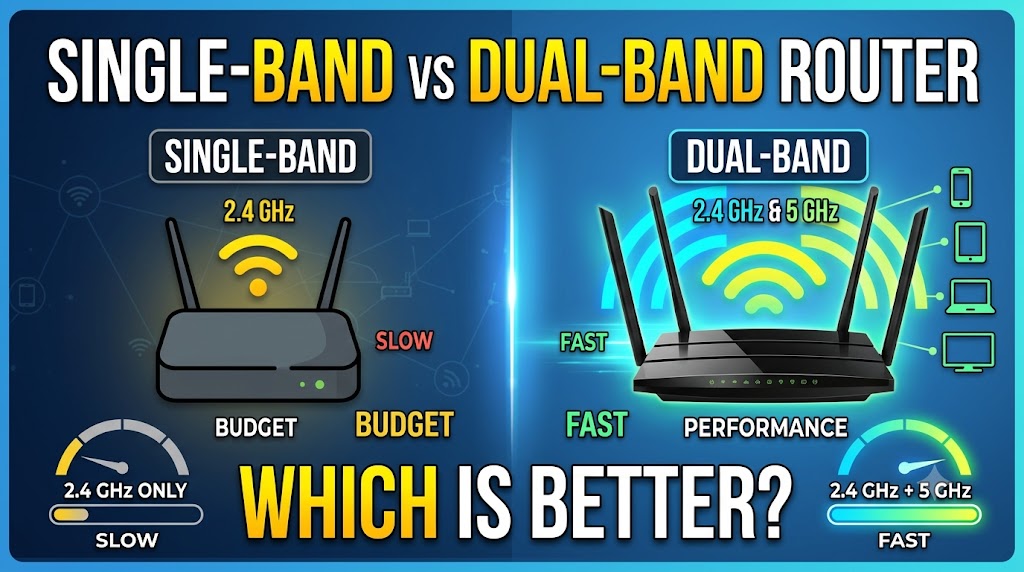
A single-band router is a wireless router that operates on one Wi-Fi frequency band, traditionally the 2.4 GHz band. The 2.4 GHz band can provide useful coverage through walls and over longer distances compared with higher-frequency bands, although actual performance depends on the environment and network conditions. Single-band routers can be suitable for basic networking needs where users do not require high wireless capacity or support for many demanding devices. However, modern homes with smartphones, laptops, smart TVs, cameras, and other connected devices may benefit from a router with additional wireless capacity.
A dual-band router operates on both the 2.4 GHz and 5 GHz Wi-Fi bands. This allows compatible devices to use either band depending on their capabilities, network conditions, and range requirements. The 2.4 GHz band generally offers better range through obstacles, while 5 GHz can provide higher wireless performance over shorter distances and typically has more available channels. Dual-band technology is therefore useful for homes with multiple Wi-Fi devices and users who want a better balance between coverage and performance. The exact capabilities still depend on the router and client devices.
Quick Comparison Table
| Feature | Single-Band Router | Dual-Band Router |
|---|---|---|
| Wi-Fi Bands | One band | 2.4 GHz + 5 GHz |
| Common Band | 2.4 GHz | 2.4 GHz and 5 GHz |
| Coverage | Generally good on 2.4 GHz | Good combination of coverage and performance |
| Wireless Speed | Usually lower | Usually higher potential |
| Device Capacity | More limited | Better for multiple devices |
| 5 GHz Support | No | Yes |
| Interference Management | More limited | Better flexibility |
| Gaming | Basic use | Better choice for demanding use |
| 4K Streaming | Less suitable | Better suited |
| Smart Home Devices | Can work well | More flexible |
| Cost | Usually lower | Usually higher |
| Best For | Basic, low-demand networks | Modern homes and multiple devices |
| Overall | Limited use cases | 🏆 Better for most users |
What Is a Single-Band Router?
A single-band router provides Wi-Fi through only one frequency band. Traditional single-band Wi-Fi routers commonly use the 2.4 GHz band.
The 2.4 GHz band has a useful characteristic: its signals generally travel farther and penetrate common obstacles better than 5 GHz signals. However, it also has fewer non-overlapping channels and is widely used by many other wireless devices, which can make congestion more noticeable in busy environments.
A single-band router can still be useful for basic activities such as web browsing, email, light streaming, and connecting simple smart-home devices.
The limitation becomes more obvious when many devices compete for wireless capacity or when users need higher performance.
What Is a Dual-Band Router?
A dual-band router provides Wi-Fi on two frequency bands: 2.4 GHz and 5 GHz.
Instead of forcing every compatible device to use the same wireless band, the network can make both bands available. Devices that benefit from the higher performance of 5 GHz can use that band, while devices farther away or those that work better with 2.4 GHz can use the lower-frequency band.
The 5 GHz band generally offers more channels and can support higher data rates than 2.4 GHz under suitable conditions. However, 5 GHz usually has shorter effective range through obstacles.
This combination makes dual-band routers considerably more versatile.
1. Number of Wi-Fi Bands
| Single-Band Router | Dual-Band Router |
|---|---|
| Uses one Wi-Fi frequency band. | Uses two Wi-Fi frequency bands. |
| Commonly uses 2.4 GHz. | Uses 2.4 GHz and 5 GHz. |
| All wireless devices share the available band. | Compatible devices can use either supported band. |
The biggest difference is straightforward: a single-band router provides one band, while a dual-band router provides two.
Having two bands does not automatically mean that every device becomes twice as fast. Instead, dual-band technology gives the network additional wireless capacity and flexibility.
Practical meaning: If you have several modern Wi-Fi devices, two available bands are generally more useful than one.
🏆 Winner: Dual-Band Router
2. 2.4 GHz Performance
| Single-Band Router | Dual-Band Router |
|---|---|
| Uses 2.4 GHz as its primary or only Wi-Fi band. | Also supports 2.4 GHz. |
| Can provide useful coverage over greater distances. | Provides the same general coverage advantage of 2.4 GHz. |
| All Wi-Fi traffic must share the available band. | Some traffic can be moved to 5 GHz. |
Both routers can use 2.4 GHz, so there is no major advantage for basic 2.4 GHz coverage simply because a router is dual-band.
The important difference is what happens when the network becomes busy. A dual-band router can provide the additional 5 GHz band for compatible devices.
Practical meaning: For 2.4 GHz alone, the two types can be similar, but dual-band provides an additional option.
🏆 Winner: Tie
3. 5 GHz Support
| Single-Band Router | Dual-Band Router |
|---|---|
| Does not support 5 GHz when it is a true single-band 2.4 GHz router. | Supports both 2.4 GHz and 5 GHz. |
| Cannot connect compatible devices through 5 GHz. | Compatible devices can use 5 GHz. |
| Limited to its single supported band. | Offers additional wireless capacity and flexibility. |
This is one of the clearest advantages of a dual-band router.
The 5 GHz band can provide higher performance than 2.4 GHz under suitable conditions. It is particularly useful for devices that need more bandwidth and are relatively close to the router.
Practical meaning: If you want 5 GHz Wi-Fi, a dual-band router is required.
🏆 Winner: Dual-Band Router
4. Wireless Speed
| Single-Band Router | Dual-Band Router |
|---|---|
| Has only one available Wi-Fi band. | Has two available Wi-Fi bands. |
| Performance is limited to the capabilities of its single band. | Can provide higher overall wireless capacity. |
| Older single-band models are often designed for basic use. | Modern dual-band routers can support higher Wi-Fi speeds. |
Dual-band does not itself guarantee a specific speed.
Actual Wi-Fi speed depends on factors including the Wi-Fi generation, channel width, modulation, router hardware, client device, signal quality, interference, distance, and other network conditions.
However, a dual-band router has a major advantage because compatible devices can use 5 GHz in addition to 2.4 GHz.
This can make the network more suitable for high-bandwidth activities.
Practical meaning: For modern wireless performance, dual-band is generally the better choice.
🏆 Winner: Dual-Band Router
5. Coverage and Range
| Single-Band Router | Dual-Band Router |
|---|---|
| A 2.4 GHz single-band router can provide useful long-range coverage. | Provides both 2.4 GHz and 5 GHz. |
| 2.4 GHz generally travels farther through obstacles than 5 GHz. | Users can use 2.4 GHz for greater reach and 5 GHz when closer to the router. |
| No second band is available for high-performance nearby devices. | Provides greater flexibility between range and performance. |
This comparison requires an important distinction.
More bands do not automatically mean more range.
The 2.4 GHz band generally has better propagation through walls and over distance than 5 GHz. Therefore, a single-band 2.4 GHz router can sometimes maintain a connection farther away than a 5 GHz network.
But a dual-band router gives users both choices.
Practical meaning: If you need maximum flexibility between range and performance, dual-band is better.
🏆 Winner: Dual-Band Router
6. Interference and Congestion
| Single-Band Router | Dual-Band Router |
|---|---|
| All Wi-Fi traffic uses the same supported band. | Traffic can be distributed across two bands. |
| 2.4 GHz can become crowded in busy environments. | 5 GHz provides an additional band for compatible devices. |
| Less flexibility when the primary band is congested. | More flexibility when choosing an appropriate band. |
The 2.4 GHz spectrum is commonly used by many wireless technologies and devices. In an apartment building or densely populated area, many nearby networks may operate in the same frequency range.
A dual-band router does not eliminate interference, but it provides another band that compatible devices can use.
The 5 GHz band generally has more available channels than 2.4 GHz, although channel availability varies by regulatory region.
Practical meaning: Dual-band provides a better way to handle busy wireless environments.
🏆 Winner: Dual-Band Router
7. Multiple Connected Devices
| Single-Band Router | Dual-Band Router |
|---|---|
| All Wi-Fi devices share one wireless band. | Compatible devices can be distributed across two bands. |
| Heavy traffic from multiple devices can increase competition for wireless airtime. | Additional band capacity can help distribute wireless traffic. |
| Better suited to simpler networks. | Better suited to modern homes with many connected devices. |
Today’s homes can have smartphones, laptops, tablets, smart TVs, printers, cameras, speakers, gaming consoles, and smart-home devices connected simultaneously.
A dual-band router gives the network more flexibility for handling these devices.
It is important to remember that simply having many devices does not automatically mean a router will become slow. What matters is how much wireless traffic those devices generate and how the router handles it.
Practical meaning: For a busy home network, dual-band is generally the stronger option.
🏆 Winner: Dual-Band Router
8. Gaming
| Single-Band Router | Dual-Band Router |
|---|---|
| Can support basic online gaming if conditions are good. | Provides 5 GHz as an additional option for compatible gaming devices. |
| Gaming traffic competes with other traffic on the same band. | Gaming devices can potentially use 5 GHz while other devices use 2.4 GHz. |
| Less flexible for busy networks. | Better suited to modern gaming setups. |
Gaming performance is influenced by much more than Wi-Fi band selection.
Internet latency, server distance, ISP routing, network congestion, Wi-Fi interference, and the gaming device all matter.
Nevertheless, a dual-band router provides more flexibility. A nearby gaming console or PC can use 5 GHz while lower-bandwidth devices remain on 2.4 GHz.
A wired Ethernet connection can still be preferable when the goal is minimizing Wi-Fi-related variability.
Practical meaning: For wireless gaming, dual-band is the better starting point.
🏆 Winner: Dual-Band Router
9. 4K Streaming and High-Bandwidth Activities
| Single-Band Router | Dual-Band Router |
|---|---|
| Can handle streaming if the network has sufficient capacity. | Better suited to distributing demanding wireless traffic. |
| High-bandwidth devices share one band. | Compatible high-bandwidth devices can use 5 GHz. |
| More limited for busy households. | More suitable for multiple demanding devices. |
Streaming quality depends on the streaming service, video resolution, internet connection, device, and network conditions.
A single-band router can still stream video successfully when the network is lightly loaded.
The advantage of dual-band appears when several devices are using the network simultaneously. A compatible streaming device can use 5 GHz while other devices continue using 2.4 GHz.
Practical meaning: For homes with multiple streaming devices, dual-band is generally preferable.
🏆 Winner: Dual-Band Router
10. Smart Home and IoT Devices
| Single-Band Router | Dual-Band Router |
|---|---|
| Many smart-home devices can operate on 2.4 GHz. | Supports 2.4 GHz for compatible IoT devices and 5 GHz for compatible higher-performance devices. |
| Can be suitable for basic smart-home networks. | Provides greater flexibility for mixed device types. |
| All devices using Wi-Fi share the same band. | Devices can potentially be separated across two bands. |
Many smart-home products use 2.4 GHz because of its range and compatibility characteristics.
This means a single-band router can still be useful for smart-home devices.
However, modern homes may have both low-bandwidth IoT devices and high-bandwidth phones, computers, cameras, and TVs. A dual-band router provides more flexibility for this mixture.
Practical meaning: Dual-band is more versatile for a modern smart home.
🏆 Winner: Dual-Band Router
11. Cost
| Single-Band Router | Dual-Band Router |
|---|---|
| Usually cheaper. | Usually costs more than basic single-band models. |
| Suitable for basic networking needs. | Provides additional wireless capabilities. |
| Lower initial cost can be attractive for simple networks. | Higher cost can be justified by greater flexibility. |
A single-band router can be attractive when price is the primary consideration.
However, the cheapest networking device is not always the best long-term choice. If a user later needs 5 GHz support, more wireless capacity, or better performance with multiple devices, replacing the router may cost more overall.
Practical meaning: Single-band wins on basic purchase price, but dual-band usually provides better value for a modern network.
🏆 Winner: Single-Band Router for Lowest Cost
12. Future-Proofing
| Single-Band Router | Dual-Band Router |
|---|---|
| More limited for modern multi-device networks. | Better suited to current Wi-Fi usage patterns. |
| May be sufficient for basic requirements. | Provides 2.4 GHz and 5 GHz flexibility. |
| Less suitable if future devices require 5 GHz. | Supports a broader range of modern Wi-Fi devices. |
Networking technology continues to evolve, and newer Wi-Fi devices commonly support multiple frequency bands.
A dual-band router therefore provides more flexibility for future devices than a basic single-band router.
This does not mean every dual-band router is future-proof. Wi-Fi standards, security features, hardware performance, and other specifications also matter.
Practical meaning: If you are buying a router today and want it to remain useful for several years, dual-band is generally the safer choice.
🏆 Winner: Dual-Band Router
Single-Band vs Dual-Band: Which Is Better for Home Use?
For most modern homes, a dual-band router is the better choice.
A single-band router can still work well when the network is simple and users only need basic internet access. For example, someone with a few devices and light browsing requirements may not need advanced wireless capabilities.
But modern homes often have multiple smartphones, laptops, TVs, cameras, gaming devices, and smart-home products. Having both 2.4 GHz and 5 GHz available gives the network more flexibility.
Therefore, unless your requirements are extremely basic or the price difference is the only important factor, dual-band is usually the more practical choice.
Single-Band vs Dual-Band for Different Users
| User Type | Recommended Choice | Reason |
|---|---|---|
| Basic Internet User | Single-Band can be enough | Low network demands |
| Small Home | Dual-Band | Better flexibility |
| Family with Multiple Devices | 🏆 Dual-Band | More wireless capacity |
| Online Gamer | 🏆 Dual-Band | 5 GHz option |
| 4K Streaming User | 🏆 Dual-Band | Better suited to demanding wireless traffic |
| Smart Home | 🏆 Dual-Band | Supports mixed device requirements |
| Large Number of Wi-Fi Devices | 🏆 Dual-Band | Two-band flexibility |
| Very Limited Budget | 🏆 Single-Band | Lower initial cost |
| Long-Term Purchase | 🏆 Dual-Band | More versatile |
Is Dual-Band Always Faster?
No.
The term “dual-band” describes the number of supported frequency bands, not a guaranteed internet speed.
A dual-band router can still perform poorly if it has weak hardware, poor antenna design, outdated Wi-Fi technology, interference, bad placement, or limited processing capacity.
Similarly, actual internet speed can be limited by your internet plan.
For example, upgrading from a single-band router to a dual-band router will not automatically increase a 100 Mbps internet connection to 500 Mbps.
The main advantage is greater wireless flexibility and capacity, not an automatic increase in internet speed.
Should You Buy a Single-Band or Dual-Band Router?
Buy a Single-Band Router If:
- You have a very basic network.
- You use only a small number of devices.
- Your internet activities are light.
- You do not need 5 GHz Wi-Fi.
- Lowest purchase price is your main priority.
- You understand the limitations of a single wireless band.
Buy a Dual-Band Router If:
- You have multiple Wi-Fi devices.
- You use smartphones, laptops, smart TVs, or gaming devices.
- You stream high-resolution video.
- You play online games over Wi-Fi.
- You have a smart home.
- You live in an area with many nearby Wi-Fi networks.
- You want better flexibility for future devices.
Final Comparison Table
| Feature | Winner |
|---|---|
| Number of Wi-Fi Bands | 🏆 Dual-Band |
| 2.4 GHz Support | Tie |
| 5 GHz Support | 🏆 Dual-Band |
| Wireless Flexibility | 🏆 Dual-Band |
| Potential Wireless Performance | 🏆 Dual-Band |
| Range Through Obstacles | 🏆 2.4 GHz / Depends |
| Handling Multiple Devices | 🏆 Dual-Band |
| Congested Wireless Environments | 🏆 Dual-Band |
| Gaming | 🏆 Dual-Band |
| Streaming | 🏆 Dual-Band |
| Smart Home | 🏆 Dual-Band |
| Lowest Purchase Cost | 🏆 Single-Band |
| Future Flexibility | 🏆 Dual-Band |
| Best for Basic Use | 🏆 Single-Band |
| Best for Most Modern Homes | 🏆 Dual-Band |
| Overall | 🏆 Dual-Band Router |
Final Verdict
For most users, the dual-band router is the better choice.
A single-band router can make sense for a very basic network where only a few devices are connected and users do not need 5 GHz Wi-Fi. Its main advantages are simplicity and lower cost.
A dual-band router, however, provides both 2.4 GHz and 5 GHz connectivity. This gives users greater flexibility, better support for modern devices, and more options when dealing with multiple connected devices and demanding activities such as gaming and streaming.
The important point is that dual-band does not automatically mean faster internet. The actual result depends on the router’s Wi-Fi technology, client devices, distance, interference, network load, and internet connection.
For a new router purchase, dual-band is generally the better choice for most homes. Single-band is mainly suitable when your networking requirements are simple and cost is the primary concern.
Disclaimer
Actual Wi-Fi performance depends on the router model, Wi-Fi generation, connected devices, distance, walls, interference, channel conditions, and internet service. Frequency-band characteristics do not guarantee a particular speed or range in every environment. Check the manufacturer’s specifications and regional wireless requirements before purchasing.