DNS vs VPN
Introduction
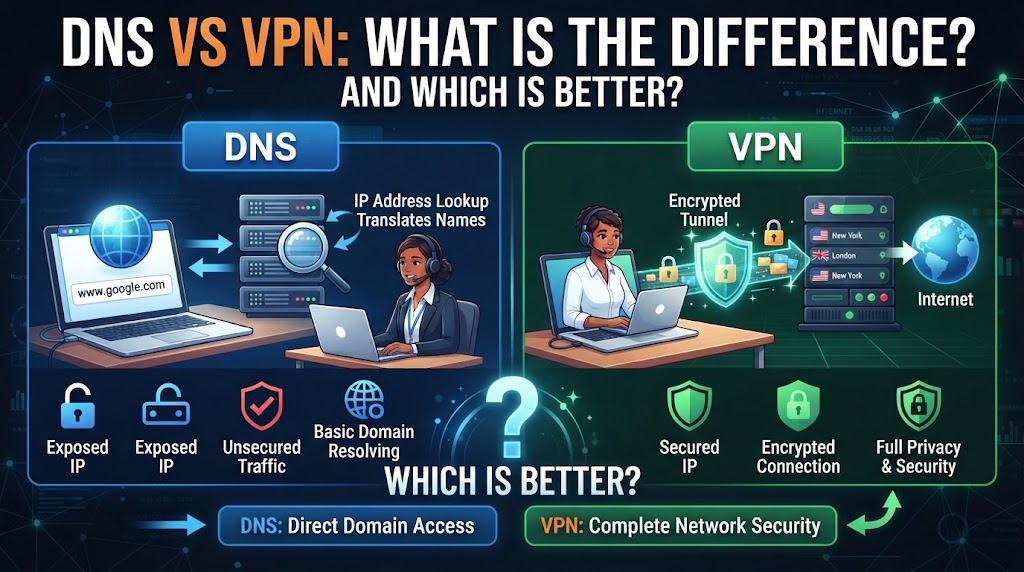
DNS and VPN are both important networking technologies, but they perform very different jobs. DNS, or Domain Name System, translates website names such as example.com into IP addresses that computers can use to connect to servers. A VPN, or Virtual Private Network, creates an encrypted connection between your device and a VPN server, helping protect network traffic from local network observers and changing the apparent internet location of your connection.
Because DNS and VPN solve different problems, they should not normally be treated as direct alternatives. DNS mainly handles domain-name resolution, while a VPN focuses on creating a protected connection between your device and a VPN server. Understanding this difference can help you choose the right technology for your particular networking or privacy requirement.
Quick Comparison Table
| Feature | DNS | VPN |
|---|---|---|
| Full Form | Domain Name System | Virtual Private Network |
| Main Purpose | Converts domain names into IP addresses | Creates an encrypted connection |
| Encrypts Internet Traffic | No, by itself | Yes, between device and VPN server |
| Changes Apparent IP | No | Usually yes |
| Main Function | Name resolution | Secure network connection |
| Can Improve Privacy | Limited, depending on DNS provider | Generally more comprehensive |
| Speed Impact | Usually very small | Can reduce speed depending on server and connection |
| Common Use | Accessing websites by domain name | Privacy, secure remote access, public Wi-Fi protection |
| Works as a Direct Alternative? | No | No |
What Is DNS?
DNS (Domain Name System) is the system that translates human-readable domain names into IP addresses.
For example, when you enter a website address into your browser, your device needs to determine the IP address associated with that domain. DNS helps perform that lookup.
A simplified process looks like this:
Website name → DNS lookup → IP address → Website connection
Without DNS, users would generally have to remember numerical IP addresses instead of convenient domain names.
What Does DNS Do?
DNS can:
- Translate domain names into IP addresses
- Help browsers locate websites
- Support email and other internet services
- Direct users to appropriate servers
- Provide additional filtering or security features when using specialized DNS services
DNS itself does not encrypt all of your internet traffic.
What Is a VPN?
A VPN (Virtual Private Network) creates an encrypted connection between your device and a VPN server.
Instead of connecting directly to websites through your normal internet connection, your traffic first travels through the VPN connection.
A simplified path is:
Your device → Encrypted VPN connection → VPN server → Internet
A VPN can hide your device’s public IP address from websites by making the VPN server’s IP address appear as the source of the connection.
What Does a VPN Do?
A VPN can:
- Encrypt traffic between your device and the VPN server
- Help protect traffic on untrusted networks
- Hide your normal public IP address from websites
- Allow secure access to certain private networks
- Provide a different apparent internet location based on the VPN server
However, a VPN does not make you completely anonymous or automatically protect against every online threat.
DNS vs VPN: Main Differences
1. Main Purpose
The biggest difference between DNS and VPN is their purpose.
DNS is primarily responsible for finding the IP address associated with a domain name.
A VPN is primarily designed to create a protected connection between your device and a VPN server.
Practical meaning: If a website name is not being resolved correctly, DNS may be relevant. If you want an encrypted connection over an untrusted network, a VPN may be relevant.
2. Encryption
Traditional DNS does not encrypt your entire internet connection.
A VPN encrypts traffic between your device and the VPN server. The exact protection depends on the VPN protocol, configuration, and service.
Practical meaning: Simply changing your DNS server is not equivalent to using a VPN.
3. IP Address
Changing your DNS server does not normally change your public IP address.
A VPN typically routes your internet traffic through its server, causing websites to see the VPN server’s public IP instead of your normal public IP.
Practical meaning: If your goal is to change the apparent IP address seen by websites, DNS alone generally does not do that.
4. Internet Speed
DNS lookups are generally very small operations, so changing DNS servers usually has little effect on overall internet speed once the connection is established.
A VPN can introduce additional processing and routing distance because traffic travels through the VPN server.
The actual impact varies according to factors such as:
- VPN server location
- Server load
- VPN protocol
- Internet connection speed
- Network conditions
5. Privacy
DNS and VPN provide different types of privacy.
DNS determines which service handles your domain-name lookups. Some DNS services offer encrypted DNS protocols such as DNS over HTTPS (DoH) or DNS over TLS (DoT).
A VPN can encrypt traffic between your device and the VPN server and can hide your normal public IP address from websites.
However, privacy depends on the specific services, configurations, logging practices, and websites involved.
DNS vs VPN: Which Is Better?
There is no universal winner because DNS and VPN are designed for different purposes.
DNS is more relevant when:
- You need domain-name resolution
- You want to change your DNS provider
- You need DNS-based filtering
- You want to use encrypted DNS
A VPN is more relevant when:
- You need an encrypted connection to a VPN server
- You are using an untrusted network such as public Wi-Fi
- You want websites to see the VPN server’s IP address
- You need secure remote access to a private network
So, DNS is not a replacement for a VPN, and a VPN is not a replacement for DNS.
Can You Use DNS and VPN Together?
Yes. In fact, a VPN connection still needs DNS resolution for many internet activities.
Some VPN services provide their own DNS servers, while others allow users to configure DNS separately.
A typical setup may look like:
Device → VPN tunnel → VPN server/DNS → Internet
The exact DNS path depends on the VPN software and configuration.
DNS vs VPN for Public Wi-Fi
When using public Wi-Fi at places such as hotels, airports, cafés, or other shared locations, a VPN can provide encryption between your device and the VPN server.
Changing DNS alone does not provide the same type of protection because DNS is primarily concerned with resolving domain names.
However, HTTPS encryption should also be used whenever available, regardless of whether a VPN is being used.
DNS vs VPN for Changing Location
DNS generally does not change the public IP address that websites see.
A VPN can make your connection appear to originate from the location of the VPN server.
For example:
Normal connection:
Your device → ISP → Website
VPN connection:
Your device → VPN server → Website
The website may see the VPN server’s IP rather than your normal public IP.
DNS vs VPN for Website Filtering
DNS-based filtering can block or redirect certain domains depending on the DNS service and its configuration.
A VPN may also provide filtering features, but its primary function is creating a VPN connection rather than simply resolving domain names.
Therefore, if the main requirement is domain-based filtering, a specialized DNS service may be more directly relevant.
DNS vs VPN: Key Takeaway
The easiest way to remember the difference is:
DNS = Finds the IP address for a domain name.
VPN = Creates an encrypted connection to a VPN server.
DNS is a fundamental part of internet communication, while a VPN is an additional networking technology designed for secure and private connections.
Conclusion
DNS and VPN are not competing technologies because they perform different functions. DNS translates domain names into IP addresses so devices can locate internet services, while a VPN creates an encrypted connection between your device and a VPN server.
If you need domain-name resolution or DNS-based filtering, DNS is the relevant technology. If you need an encrypted connection, want to hide your normal public IP address from websites, or need secure access to a private network, a VPN may be more appropriate. In many situations, DNS and VPN can also work together.
Disclaimer
DNS and VPN behavior can vary depending on the provider, device, operating system, VPN protocol, DNS configuration, and network. Privacy and security features should be checked against the specific service’s documentation and policies. A VPN does not guarantee complete anonymity or protection from every online threat.