
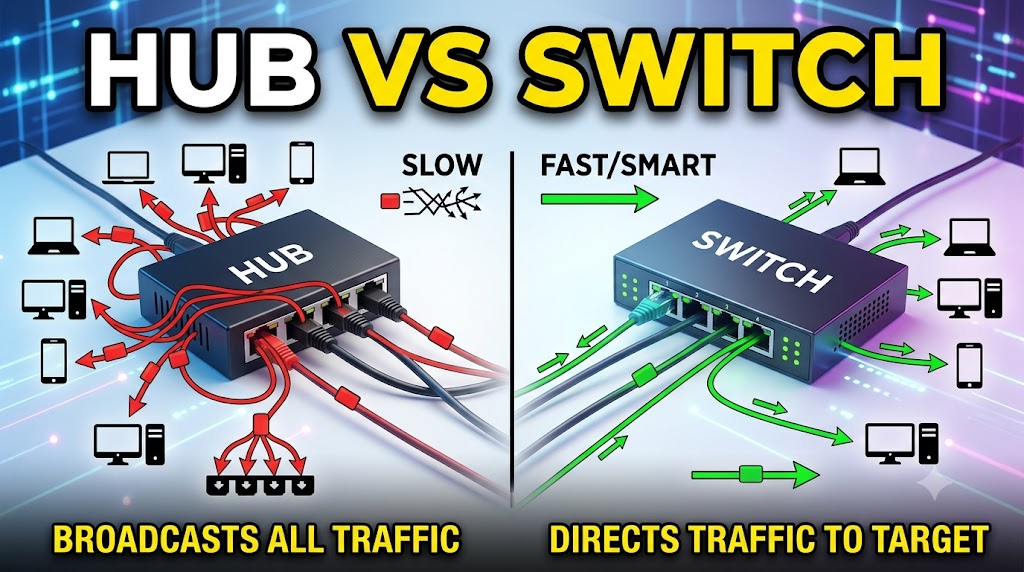
Hub vs Switch
SEO Title: Hub vs Switch: Which Networking Device Is Better?
Meta Title: Hub vs Switch: Which Networking Device Is Better?
Meta Description: Compare hub vs switch to understand their differences in data transmission, speed, network efficiency, security, and practical use, and find out which networking device is better for your needs.
URL Slug: hub-vs-switch-which-networking-device-is-better
Introduction: What Is a Hub?
A network hub is a basic networking device used to connect multiple Ethernet devices within a local area network (LAN). When a hub receives an Ethernet frame, it generally repeats the incoming signal to all of its other ports rather than determining which specific device should receive the data. Because of this simple operating method, hubs can create unnecessary network traffic when multiple devices communicate at the same time. Hubs were once used in basic Ethernet networks but have largely been replaced by switches because switches can forward traffic more selectively and efficiently. Modern networks generally use switches instead of traditional hubs.
Introduction: What Is a Switch?
A network switch is a networking device designed to connect multiple devices within a LAN while forwarding Ethernet frames more selectively. A typical Layer 2 switch learns the MAC addresses associated with its ports and uses that information to send frames toward the appropriate destination port. This reduces unnecessary traffic compared with a traditional hub. Switches are widely used to connect computers, printers, servers, IP cameras, access points, and other Ethernet devices. They are available in unmanaged and managed versions, with advanced switches providing additional features for larger and more complex networks.
Quick Comparison Table
| Feature | Hub | Switch |
|---|---|---|
| Primary function | Connects LAN devices | Connects LAN devices |
| Data forwarding | Broadcasts/repeats to ports | Forwards frames selectively |
| Address learning | No MAC address table | Learns MAC addresses |
| Collision handling | Shared collision domain | Each switch port normally forms a separate collision domain |
| Efficiency | Lower | Higher |
| Network traffic | More unnecessary traffic | More selective traffic forwarding |
| Duplex support | Typically half-duplex | Supports full-duplex on appropriate Ethernet links |
| Security | Very limited | Better control, especially managed switches |
| Network performance | Lower in typical shared Ethernet use | Generally better |
| Modern usage | Rare/legacy | Common |
| Best for | Legacy/simple setups | Modern wired networks |
| Overall winner | — | 🏆 Switch |
Hub vs Switch: Main Difference
The biggest difference between a hub and a switch is how they handle incoming Ethernet traffic.
A traditional hub does not intelligently determine the destination device. Instead, it repeats the incoming signal across its other ports.
A switch can learn the MAC addresses of connected devices and use that information to forward frames to the appropriate port when the destination is known.
This makes switching considerably more efficient for modern Ethernet networks.
Practical meaning:
If several computers are connected, a hub can send traffic to multiple connected ports even when only one device is the intended destination. A switch can normally direct the frame toward the correct port.
🏆 Winner: Switch
Hub vs Switch: How Data Is Transmitted
Hub
A hub operates at the physical layer of the OSI model. It repeats electrical or optical signals and does not make forwarding decisions based on MAC addresses.
When one connected device transmits, the hub repeats the signal to its other ports.
Switch
A traditional Layer 2 switch operates at the data-link layer. It examines Ethernet frames and can use MAC addresses to determine where frames should be forwarded.
A switch builds a MAC address table by learning which devices are associated with its ports.
Practical meaning:
The switch has greater awareness of the local network and can make forwarding decisions instead of simply repeating traffic.
🏆 Winner: Switch
Hub vs Switch: MAC Address Handling
Hub
A traditional hub does not maintain a MAC address forwarding table. It does not need to know which MAC address belongs to which port because it simply repeats traffic.
Switch
A Layer 2 switch learns source MAC addresses and associates them with switch ports. When the destination MAC address is known, the switch can forward the frame through the relevant port.
If the destination is unknown, the switch may flood the frame within the relevant LAN segment, subject to the network’s configuration.
Practical meaning:
MAC address learning is one of the key reasons a switch can handle LAN traffic more efficiently than a traditional hub.
🏆 Winner: Switch
Hub vs Switch: Network Efficiency
Hub
Because a hub repeats traffic to its other ports, devices share the same transmission environment. Unnecessary traffic can therefore reach devices that are not the intended destination.
Switch
A switch can normally send known unicast traffic only toward the port where the destination device is connected. This reduces unnecessary traffic compared with a traditional hub.
Switches therefore make much better use of Ethernet network capacity in typical modern LAN environments.
Practical meaning:
When multiple devices are communicating, a switch provides a much more efficient network structure.
🏆 Winner: Switch
Hub vs Switch: Collision Domain
Hub
All ports on a traditional Ethernet hub share the same collision domain. If two devices transmit simultaneously, their signals can collide.
Traditional hub-based Ethernet therefore relies on mechanisms such as CSMA/CD to deal with collisions.
Switch
Each switch port normally represents a separate collision domain. With full-duplex Ethernet, collisions are eliminated on that link because devices can transmit and receive simultaneously without using the shared half-duplex collision mechanism.
Practical meaning:
A switch greatly reduces the collision problems associated with traditional hub-based Ethernet.
🏆 Winner: Switch
Hub vs Switch: Speed
Hub
Traditional Ethernet hubs commonly operated in shared, half-duplex environments. The available network capacity is shared among connected devices.
Switch
Switches can support full-duplex Ethernet and are available in many different port speeds, depending on the model and Ethernet standard.
Because each switched connection can operate independently, switches generally provide substantially better practical network performance than traditional hubs.
Practical meaning:
For modern wired networks, a switch is the clear practical choice when performance matters.
🏆 Winner: Switch
Hub vs Switch: Full-Duplex Communication
Hub
Traditional hubs are associated with half-duplex Ethernet because multiple devices share the same transmission medium.
Switch
Switches can support full-duplex communication when the connected devices and Ethernet links support it.
Full-duplex communication allows a device to transmit and receive simultaneously on a switched Ethernet link.
Practical meaning:
Full-duplex switching improves the efficiency of modern Ethernet connections and avoids the collision behavior associated with shared half-duplex networks.
🏆 Winner: Switch
Hub vs Switch: Security
Hub
A hub provides very little traffic control. Because traffic is repeated across ports, a connected device may receive traffic that was not specifically intended for it.
This does not automatically mean that every communication can be read by another device, because additional factors such as network protocols, encryption, and traffic type matter.
Switch
A switch provides more control over traffic forwarding. Managed switches can also provide features such as VLANs, port security, monitoring, and access-control-related capabilities, depending on the model.
Practical meaning:
A switch provides a much stronger foundation for controlling and managing modern LAN traffic.
🏆 Winner: Switch
Hub vs Switch: Broadcast Traffic
Hub
A hub repeats Ethernet signals to its other ports. It does not distinguish between different types of Ethernet destinations in the way a Layer 2 switch does.
Switch
A switch selectively forwards known unicast frames but still forwards broadcast frames within the relevant broadcast domain. VLANs and Layer 3 network design can be used to separate broadcast domains.
Therefore, a switch does not completely eliminate broadcast traffic.
Practical meaning:
A switch handles normal unicast traffic much more selectively, but it is not correct to say that switches block all network broadcasts.
🏆 Winner: Switch
Hub vs Switch: Network Management
Hub
Traditional hubs are generally simple plug-and-play devices with little or no management functionality.
Switch
Switches are available as:
- Unmanaged switches
- Smart switches
- Managed switches
Managed switches can provide configuration and monitoring capabilities such as VLAN configuration, port settings, traffic monitoring, and other advanced functions depending on the model.
Practical meaning:
If you need control over how a network operates, a managed switch offers far more possibilities than a traditional hub.
🏆 Winner: Switch
Hub vs Switch: Power Consumption
Hub
Traditional hubs have simple hardware, but their technology is outdated and they are rarely selected for modern network deployments.
Switch
Modern switches are designed for contemporary Ethernet networks and can provide significantly more networking capability. Power consumption varies considerably by model, port count, speed, and additional features.
It would therefore be inaccurate to claim that every switch consumes less power than every hub.
Practical meaning:
Power consumption should be compared using the actual specifications of the devices rather than assuming one category is always more efficient.
🏆 Winner: Depends on the Model
Hub vs Switch: Cost
Hub
Traditional hubs may appear inexpensive because of their simpler technology. However, hubs are largely legacy equipment and are not normally the preferred choice for a new network.
Switch
Modern Ethernet switches are available across a wide range of prices, from inexpensive unmanaged models to advanced managed enterprise switches.
For a new network, the relevant question is not simply which device has the lower purchase price. Network performance, reliability, management requirements, port speed, and long-term usefulness also matter.
Practical meaning:
Even if an old hub is inexpensive, a switch is generally the more practical investment for a modern network.
🏆 Winner: Switch
Hub vs Switch: Home Network
Hub
A traditional hub is generally unnecessary for a modern home network.
Switch
A switch is useful when a router does not have enough Ethernet ports for all wired devices.
For example:
Internet → Router → Switch → PC + TV + Printer + IP Camera
A switch can provide additional wired Ethernet connections without replacing the router.
Practical meaning:
For a modern home network, choose a switch rather than a traditional hub when additional Ethernet ports are required.
🏆 Winner: Switch
Hub vs Switch: Office Network
Hub
Traditional hubs are poorly suited to modern offices because they do not provide the traffic efficiency and management capabilities expected from contemporary wired networks.
Switch
Switches are widely used in offices to connect computers, printers, servers, IP phones, access points, cameras, and other Ethernet devices.
Managed switches can also support network segmentation and administration features when required.
Practical meaning:
For office networking, a switch is the appropriate modern solution.
🏆 Winner: Switch
Hub vs Switch: CCTV Network
Hub
A traditional hub is not a suitable choice for a modern IP CCTV installation because multiple cameras can generate significant network traffic and the hub cannot selectively forward frames.
Switch
Switches are commonly used to connect IP cameras and network video recorders. PoE switches can also provide both Ethernet connectivity and electrical power to compatible PoE devices.
The exact requirements depend on the cameras, NVR, bandwidth, PoE standard, cable length, and network design.
Practical meaning:
For IP CCTV, a suitable switch—often a PoE switch where supported—is much more appropriate than a traditional hub.
🏆 Winner: Switch
Hub vs Switch: Computer Lab
Hub
A hub can technically connect Ethernet devices in legacy network environments, but it is not the preferred solution for a modern computer lab.
Switch
A switch allows multiple computers to connect to the same LAN while forwarding traffic more selectively. It can also provide higher-speed Ethernet and, with managed models, additional network-management capabilities.
Practical meaning:
A switch is the practical choice for a modern computer lab.
🏆 Winner: Switch
Hub vs Switch: Which One Should You Choose?
Choose a Switch If:
- You are building a new network.
- You need multiple Ethernet ports.
- You want better LAN performance.
- You need full-duplex Ethernet.
- You are connecting computers, printers, cameras, servers, or access points.
- You need network management features.
- You are expanding an existing wired network.
Consider a Hub Only If:
A hub may still be relevant for studying legacy Ethernet technology or maintaining a specific old network environment. It is generally not the preferred device for a new modern LAN.
🏆 Winner: Switch
Hub vs Switch: Pros and Cons
| Device | Advantages | Disadvantages |
|---|---|---|
| Hub | Simple design, historically inexpensive, useful for understanding legacy Ethernet | Shared collision domain, unnecessary traffic, half-duplex limitations, very limited management |
| Switch | Selective forwarding, better efficiency, full-duplex support, modern Ethernet speeds, management options | More complex than a basic hub and advanced managed models can cost more |
Final Comparison Table
| Feature | Hub | Switch | Winner |
|---|---|---|---|
| Data forwarding | Repeats traffic | Selective forwarding | 🏆 Switch |
| MAC address learning | No | Yes, for typical Layer 2 switching | 🏆 Switch |
| Network efficiency | Lower | Higher | 🏆 Switch |
| Collision domain | Shared | Separate per switch port | 🏆 Switch |
| Full-duplex Ethernet | No for traditional hub operation | Yes, when supported | 🏆 Switch |
| Network performance | Lower | Higher | 🏆 Switch |
| Security/control | Very limited | Greater, especially managed models | 🏆 Switch |
| Management | Very limited | Basic to advanced | 🏆 Switch |
| Home networking | Legacy/rare use | Modern choice | 🏆 Switch |
| Office networking | Not recommended for new networks | Standard choice | 🏆 Switch |
| IP CCTV | Poor choice | Suitable | 🏆 Switch |
| Computer lab | Legacy option | Suitable | 🏆 Switch |
| Power consumption | Depends on model | Depends on model | Tie |
| Modern network use | Rare | Common | 🏆 Switch |
| Overall | Legacy technology | Modern networking solution | 🏆 Switch |
Final Verdict
When comparing Hub vs Switch, the switch is the clear winner for almost all modern networking requirements.
A traditional hub simply repeats network signals and does not make intelligent forwarding decisions. This creates a shared communication environment with more unnecessary traffic and collision limitations.
A switch, in contrast, can learn MAC addresses and selectively forward Ethernet frames. Modern switches also support full-duplex communication and can offer significantly more speed, scalability, and management capability.
For a home network, office, computer lab, IP CCTV system, or new wired network, a suitable switch is generally the better choice.
A hub is mainly relevant today when studying legacy Ethernet technology or dealing with a specific old network requirement.
Disclaimer
Networking behavior can vary depending on the Ethernet standard, device model, configuration, and network architecture. This article compares traditional Ethernet hubs with modern network switches at a general technical level. Always check the manufacturer’s specifications when selecting networking equipment for a specific installation.