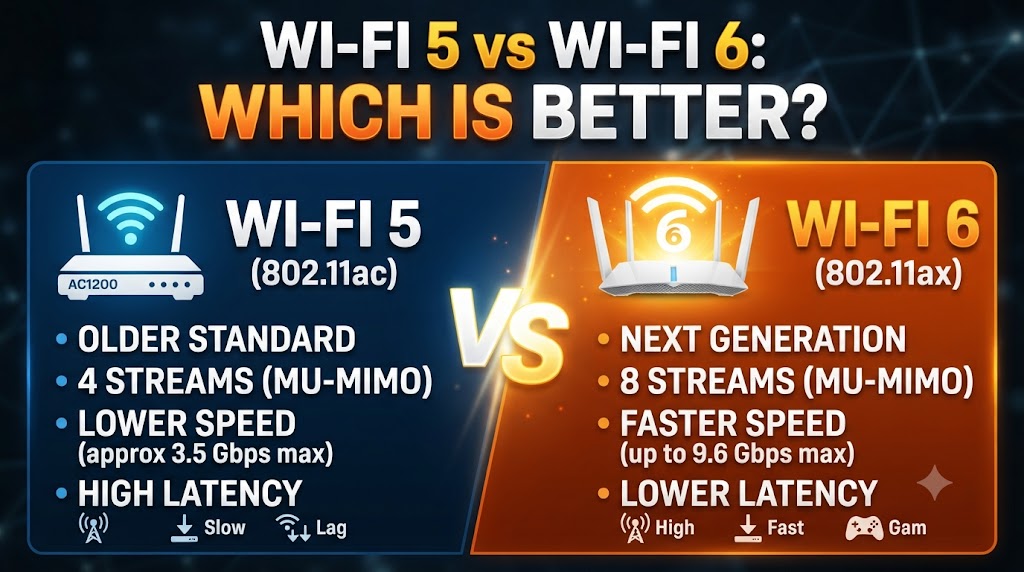
Wi-Fi 5 vs Wi-Fi 6
Wi-Fi 5 and Wi-Fi 6 are two generations of wireless networking technology used in routers, laptops, smartphones, smart TVs, and other connected devices. Wi-Fi 5 is based on IEEE 802.11ac and primarily operates on the 5 GHz band. Wi-Fi 6 is based on IEEE 802.11ax and can operate on both 2.4 GHz and 5 GHz bands. (Intel)
The main difference is not simply speed. Wi-Fi 6 introduces technologies such as OFDMA, improved MU-MIMO support, Target Wake Time, and 1024-QAM. These features are designed to improve efficiency, capacity, and performance, particularly when many devices are connected to the same network. (Intel)
Wi-Fi 5 vs Wi-Fi 6: Quick Comparison
| Feature | Wi-Fi 5 | Wi-Fi 6 |
|---|---|---|
| IEEE standard | 802.11ac | 802.11ax |
| Main bands | 5 GHz | 2.4 GHz and 5 GHz |
| Maximum theoretical data rate | About 7 Gbps | About 9.6 Gbps |
| Channel widths | Up to 160 MHz | Up to 160 MHz |
| Modulation | Up to 256-QAM | Up to 1024-QAM |
| OFDMA | No | Yes |
| MU-MIMO | Downlink | Uplink and downlink |
| Target Wake Time | No | Yes |
| Network efficiency | Good | Improved |
| Multiple-device handling | Good | Better suited to dense networks |
| Security | Commonly WPA2 | WPA2/WPA3 support depending on device |
| Best suited for | Existing 5 GHz networks | Newer, busy networks |
Theoretical maximum figures do not represent the speed you will necessarily receive in everyday use. Actual performance depends on the router, client device, channel width, distance, interference, number of spatial streams, and other network conditions. (Intel)
What Is Wi-Fi 5?
Wi-Fi 5 is the common name for IEEE 802.11ac. It was designed primarily around the 5 GHz band and brought substantial improvements over previous Wi-Fi generations.
Wi-Fi 5 supports channel widths up to 80 MHz and 160 MHz, 256-QAM modulation, and downlink MU-MIMO. These technologies can provide high wireless throughput when compatible devices have a strong connection to the router. (Intel)
Wi-Fi 5 remains capable for many everyday activities, including web browsing, video streaming, online gaming, video calls, and file transfers.
Advantages of Wi-Fi 5
- Good 5 GHz wireless performance.
- Supports high-speed connections.
- Supports 80 MHz and 160 MHz channels.
- Supports downlink MU-MIMO.
- Compatible with many existing devices.
- Can be sufficient for smaller or less crowded networks.
Limitations of Wi-Fi 5
The biggest limitation is that Wi-Fi 5 lacks some of the efficiency improvements introduced with Wi-Fi 6.
For example, Wi-Fi 5 does not use OFDMA in the same way Wi-Fi 6 does. It also does not provide the same uplink and downlink MU-MIMO capabilities of Wi-Fi 6. (Intel)
As the number of connected devices increases, these differences can become more important.
What Is Wi-Fi 6?
Wi-Fi 6 is based on IEEE 802.11ax. Unlike Wi-Fi 5, Wi-Fi 6 is designed to work across both 2.4 GHz and 5 GHz bands.
Its major improvements include OFDMA, uplink and downlink MU-MIMO, Target Wake Time, and 1024-QAM. These features are intended to improve wireless efficiency and network capacity. (Intel)
Wi-Fi 6 is particularly useful in environments where many devices are connected at the same time.
Advantages of Wi-Fi 6
- Supports both 2.4 GHz and 5 GHz.
- Introduces OFDMA.
- Supports uplink and downlink MU-MIMO.
- Supports Target Wake Time.
- Uses up to 1024-QAM.
- Provides higher theoretical maximum data rates.
- Designed to improve performance in crowded networks.
- Can provide better efficiency with many connected devices. (Intel)
Limitations of Wi-Fi 6
A Wi-Fi 6 router does not automatically make every connected device faster.
To benefit from Wi-Fi 6-specific features, the client device also needs compatible Wi-Fi 6 hardware. Older Wi-Fi devices can still connect to a Wi-Fi 6 network, but they cannot use every new Wi-Fi 6 feature.
The router and client capabilities therefore both matter.
Wi-Fi 5 vs Wi-Fi 6: Speed
Wi-Fi 6 has a higher theoretical maximum data rate than Wi-Fi 5. Intel lists approximately 9.6 Gbps for Wi-Fi 6 compared with approximately 7 Gbps for Wi-Fi 5 at the generation level. (Intel)
However, these are theoretical aggregate figures and should not be treated as normal internet speeds.
For example, a particular Wi-Fi 6 client may have a maximum speed much lower than 9.6 Gbps. Intel’s Wi-Fi 6 AX201 client is specified for up to 2.4 Gbps with a 2×2 configuration and 160 MHz channel support. (Intel)
Therefore, when comparing Wi-Fi 5 vs Wi-Fi 6 for speed, it is better to look at the complete router and client specifications rather than only the Wi-Fi generation number.
Wi-Fi 5 vs Wi-Fi 6: Multiple Devices
This is one of the most important differences.
Wi-Fi 6 was designed with crowded wireless environments in mind. OFDMA allows a wireless channel to be divided into smaller resource units so that multiple devices can be served more efficiently. Wi-Fi 6 also adds uplink MU-MIMO alongside downlink MU-MIMO. (Intel)
This can be useful in a home containing:
- Smartphones
- Laptops
- Smart TVs
- CCTV cameras
- Gaming consoles
- Smart speakers
- Smart plugs
- Tablets
- Printers
- Other IoT devices
Wi-Fi 5 can still handle multiple devices, but Wi-Fi 6 has more features specifically designed to improve efficiency in busy wireless networks.
Wi-Fi 5 vs Wi-Fi 6: OFDMA
OFDMA is one of the key Wi-Fi 6 improvements.
Instead of treating every transmission opportunity in the same way, OFDMA allows the wireless channel to be divided into smaller resource units. This enables the access point to efficiently serve multiple devices during the same transmission opportunity.
This is particularly useful when many devices are sending or receiving relatively small amounts of data.
For a normal user, the practical meaning is simple: Wi-Fi 6 can manage busy networks more efficiently than Wi-Fi 5.
Wi-Fi 5 vs Wi-Fi 6: MU-MIMO
Wi-Fi 5 introduced downlink MU-MIMO capabilities, allowing a compatible access point to communicate with multiple clients simultaneously in supported scenarios.
Wi-Fi 6 expands this by supporting both uplink and downlink MU-MIMO. (Intel)
This can improve network efficiency when multiple compatible devices are communicating with the router.
However, the actual benefit depends on the router and client devices supporting the relevant features.
Wi-Fi 5 vs Wi-Fi 6: 2.4GHz Support
Another major difference is frequency-band support.
Wi-Fi 5 is primarily associated with the 5 GHz band, while Wi-Fi 6 supports both 2.4 GHz and 5 GHz. (Intel)
This gives Wi-Fi 6 routers more flexibility for devices that require longer-range 2.4 GHz connectivity.
It is important to note that Wi-Fi 6E is the version that extends Wi-Fi 6 technology into the 6 GHz band. Standard Wi-Fi 6 should not be confused with Wi-Fi 6E. (Intel)
Wi-Fi 5 vs Wi-Fi 6: Gaming
Both Wi-Fi 5 and Wi-Fi 6 can be used for gaming.
For a gaming device close to the router, a good Wi-Fi 5 connection may already provide sufficient bandwidth. The difference becomes more relevant when other devices are heavily using the network at the same time.
Wi-Fi 6’s efficiency features can help manage busy networks, which can be useful in homes where gaming takes place alongside streaming, video calls, downloads, and smart-device traffic.
However, Wi-Fi generation alone does not determine gaming latency. Router quality, signal strength, interference, network congestion, and whether the device uses wired Ethernet are also important.
Wi-Fi 5 vs Wi-Fi 6: Streaming
Both standards can support high-quality video streaming.
Wi-Fi 5 can provide enough bandwidth for many streaming setups, especially when the router and device have a strong 5 GHz connection.
Wi-Fi 6 becomes more useful when multiple devices are streaming or using the network simultaneously. Its efficiency features are designed to improve performance in networks with many active clients.
Therefore, upgrading to Wi-Fi 6 is not necessarily required simply because you want to watch high-resolution video. The benefit depends on the overall network workload.
Wi-Fi 5 vs Wi-Fi 6: Smart Home Devices
Wi-Fi 6 can be useful in homes with a large number of smart devices.
Features such as OFDMA and Target Wake Time were designed to improve efficiency and device management. Target Wake Time can help compatible devices coordinate when they need to communicate with the network, which can be useful for battery-powered devices. (Intel)
However, many smart home products still operate on older Wi-Fi standards. A Wi-Fi 6 router can support older compatible Wi-Fi devices, but those devices will not suddenly gain Wi-Fi 6 capabilities.
Wi-Fi 5 vs Wi-Fi 6: Security
Wi-Fi 6 devices can support WPA3, although exact security capabilities depend on the specific certified product and configuration. Intel identifies WPA3 as part of Wi-Fi 6’s security improvements. (Intel)
Security should therefore be considered when purchasing a new router, particularly if the router will be used for many years.
At the same time, security depends on configuration, firmware updates, passwords, and the specific router—not only on the Wi-Fi generation.
Wi-Fi 5 vs Wi-Fi 6: Range
Wi-Fi 6 is not automatically a long-range version of Wi-Fi.
Both Wi-Fi 5 and Wi-Fi 6 can operate on the 5 GHz band, and Wi-Fi 6 can also operate at 2.4 GHz. The actual coverage depends on the frequency used, router power and antenna design, client device, walls, interference, and other environmental factors.
Therefore, do not choose Wi-Fi 6 solely because you expect it to provide dramatically longer range.
Do You Need a Wi-Fi 6 Router?
You may not need to upgrade immediately if your current Wi-Fi 5 network already provides the speed and stability you require.
A Wi-Fi 5 router can remain practical when:
- You have a limited number of devices.
- Your current network is stable.
- Most devices work well on 5 GHz.
- Your internet connection does not require additional wireless capacity.
- You do not need newer Wi-Fi 6 features.
A Wi-Fi 6 router becomes more attractive when:
- Many devices are connected.
- Your home has significant wireless traffic.
- You are buying a new router for long-term use.
- Your newer phones, laptops, or other devices support Wi-Fi 6.
- You want newer network-efficiency features.
Is Wi-Fi 6 Faster Than Wi-Fi 5?
At the standard level, Wi-Fi 6 has a higher theoretical maximum data rate.
However, saying that every Wi-Fi 6 device will be faster than every Wi-Fi 5 device would be misleading.
For example, Wi-Fi 6 client products can have very different specifications. Intel lists Wi-Fi 6 client products with maximum speeds ranging from 600 Mbps to 2.4 Gbps depending on the model and configuration. (Intel)
The same principle applies to routers.
When comparing two specific routers, check their supported bands, channel width, spatial streams, maximum link rates, processor capabilities, Ethernet ports, and other features rather than relying only on the Wi-Fi generation.
Wi-Fi 5 vs Wi-Fi 6: Which Should You Choose?
Choose Wi-Fi 5 if your current network already meets your needs and you have a relatively simple wireless setup.
Choose Wi-Fi 6 if you are buying a new router and have many connected devices, compatible newer devices, or a network where wireless efficiency is important.
If the price difference between two otherwise suitable routers is small, comparing the complete specifications can be more useful than looking only at the Wi-Fi generation.
Wi-Fi 5 vs Wi-Fi 6: Final Comparison
| Requirement | More Suitable Option |
|---|---|
| Existing basic home network | Wi-Fi 5 can be sufficient |
| New router purchase | Wi-Fi 6 can be considered |
| Many connected devices | Wi-Fi 6 |
| Network efficiency | Wi-Fi 6 |
| OFDMA | Wi-Fi 6 |
| Uplink + downlink MU-MIMO | Wi-Fi 6 |
| 2.4 GHz + 5 GHz support | Wi-Fi 6 |
| Basic 5 GHz networking | Wi-Fi 5 |
| High theoretical aggregate capacity | Wi-Fi 6 |
| Older Wi-Fi devices | Both can support compatible older devices |
| Heavy multi-device household | Wi-Fi 6 |
Conclusion
The Wi-Fi 5 vs Wi-Fi 6 comparison is about more than maximum speed. Wi-Fi 5 remains capable for many everyday networking requirements, while Wi-Fi 6 introduces newer technologies designed to improve efficiency and capacity.
Wi-Fi 6 supports both 2.4 GHz and 5 GHz and adds features such as OFDMA, uplink and downlink MU-MIMO, Target Wake Time, and 1024-QAM. These improvements can be particularly useful when many devices share the same network. (Intel)
For a simple network that already performs well, Wi-Fi 5 may still be adequate. For a new router or a busy household with many compatible devices, Wi-Fi 6 provides newer capabilities that can make the network more efficient.
Disclaimer
Wi-Fi performance varies by router, client device, Wi-Fi configuration, channel width, spatial streams, distance, walls, interference, network traffic, and internet connection. Theoretical maximum speeds are not the same as real-world internet speeds. Features and specifications can also vary between individual products, so check the manufacturer’s latest specifications before purchasing a router or Wi-Fi device.