Public IP vs Private IP
Introduction
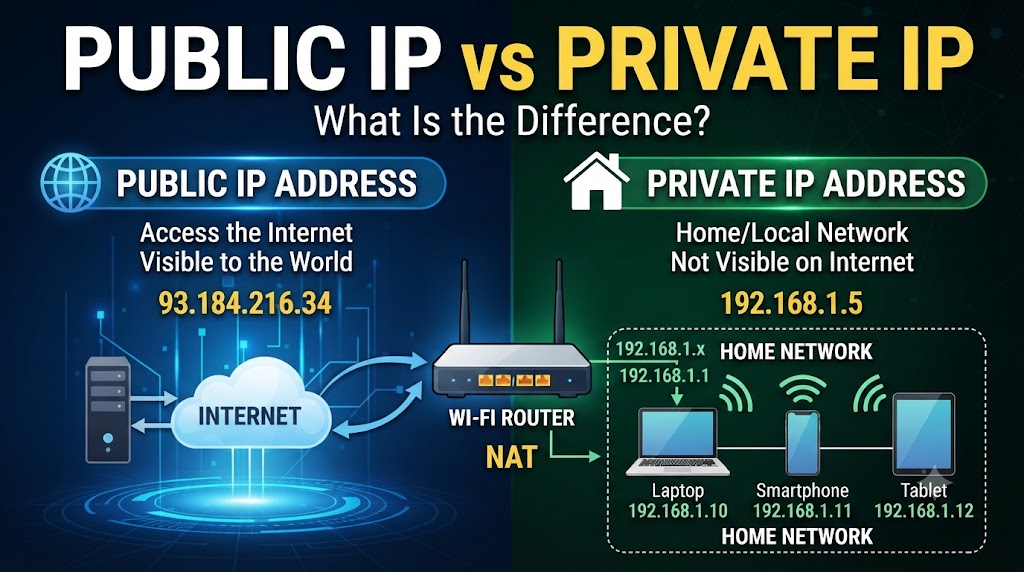
A Public IP and a Private IP are both used to identify devices or networks, but they work in different ways. A Public IP is used to identify a network or device on the internet, while a Private IP is used within a local network such as a home, office, or school. Understanding the difference between Public IP and Private IP can help you better understand how devices connect to the internet and communicate with each other.
The main difference is where each IP address is used. A Public IP is generally assigned by an Internet Service Provider (ISP) and can be reachable from the internet, depending on network configuration and firewall rules. A Private IP is assigned inside a local network by a router or network administrator and is normally not directly reachable from the public internet. Both have important roles in modern networking.
Quick Comparison Table
| Feature | Public IP | Private IP |
|---|---|---|
| Main Use | Communication over the internet | Communication within a local network |
| Assigned By | ISP or network provider | Router or network administrator |
| Internet Reachability | Potentially reachable from the internet | Not directly reachable from the public internet |
| Uniqueness | Globally unique at a given time | Can be reused on different private networks |
| Common Use | Internet-facing services and network identification | PCs, phones, printers, cameras and other local devices |
| Example | 203.0.113.10* | 192.168.1.10 |
| NAT Usually Needed | Not necessarily | Usually required for internet access |
| Typical Scope | Internet/WAN | Local network/LAN |
*Example address for explanation only.
What Is a Public IP?
A Public IP address is an IP address used for communication across the public internet. It identifies a network interface or connection in a way that allows internet traffic to be routed toward the appropriate network.
For example, your home router may receive a Public IP from your ISP. Devices inside your home can then access websites and online services through that internet connection.
A Public IP does not automatically mean that every device behind the router is directly accessible from the internet. Firewalls, NAT, port forwarding, and other network settings can affect whether incoming connections are allowed.
Where Is a Public IP Used?
Public IP addresses can be used for:
- Internet connections
- Web servers
- Email servers
- Cloud services
- Remote-access systems
- VPN servers
- Other internet-facing services
What Is a Private IP?
A Private IP address is used inside a local network. It allows devices such as computers, smartphones, printers, smart TVs, and CCTV cameras to communicate with each other without requiring every device to have its own Public IP.
Common private IPv4 address ranges include:
- 10.0.0.0 – 10.255.255.255
- 172.16.0.0 – 172.31.255.255
- 192.168.0.0 – 192.168.255.255
For example, a home router may assign 192.168.1.10 to a computer and 192.168.1.20 to a smartphone.
The same private IP address can be used on completely different private networks because private addresses are not globally unique.
Public IP vs Private IP: Main Differences
1. Internet Communication
A Public IP is designed for addressing on the public internet, while a Private IP is intended for use within a private network.
For example, your router may have a Public IP for its internet connection while your laptop has a Private IP inside your home network.
Practical meaning: Your laptop can communicate with the internet through the router without needing its own Public IP.
2. Address Assignment
Public IP addresses are generally provided by an ISP or another upstream network provider.
Private IP addresses are commonly assigned by a router using DHCP or manually configured by a network administrator.
Practical meaning: In a typical home network, you don’t normally need to manually assign private IP addresses to every device.
3. Uniqueness
A Public IP must be globally routable and appropriately allocated so internet traffic can reach the intended network.
Private IP addresses can be reused across separate networks.
For example, your home network and an office network can both use 192.168.1.10 without causing a conflict between those two separate networks.
4. Network Address Translation
Private IP addresses commonly use Network Address Translation (NAT) when devices communicate with the public internet.
A router can translate private addresses into a Public IP when sending traffic to the internet and maintain the necessary connection information for returning traffic.
Practical meaning: Multiple devices in your home can share one Public IP while using different Private IP addresses internally.
5. Security
A Private IP is not directly reachable from the public internet in the normal way. This provides network separation, but it should not be treated as a complete security mechanism.
A Public IP can be exposed to internet traffic, so firewalls and other security controls are important.
Practical meaning: Whether a device is protected depends on the overall network configuration, not simply whether its address is public or private.
Public IP vs Private IP: Which One Is Better?
Neither is universally better because they serve different purposes.
A Public IP is needed when a service or network interface needs a globally routable internet address.
A Private IP is more appropriate for devices communicating within a local network.
So, instead of choosing one over the other, most networks use both. For example, a home router can have a Public IP on its internet-facing side while assigning Private IP addresses to devices inside the home.
Can a Private IP Access the Internet?
Yes. A device with a Private IP can normally access the internet through a router using NAT.
For example:
Laptop → Private IP → Router/NAT → Public IP → Internet
The laptop does not need its own Public IP for ordinary web browsing.
Can You Access a Device Using Its Private IP From the Internet?
Normally, a Private IP cannot be directly routed across the public internet.
If remote access is required, the network may use mechanisms such as:
- Port forwarding
- VPN
- Remote-access services
- Other network-specific configurations
The exact method depends on the application and network setup.
Public IP vs Private IP for Home Networks
A typical home network might look like this:
Internet → Public IP → Router → Private IPs → Devices
The router connects the local network to the internet. Devices such as laptops, phones, printers, smart TVs, and CCTV cameras can use Private IP addresses inside the network.
This arrangement reduces the need for a separate Public IPv4 address for every device.
Public IP vs Private IP for CCTV Cameras
Private IP addresses are commonly used by IP cameras within a local network.
For example:
- Camera 1 →
192.168.1.101 - Camera 2 →
192.168.1.102 - NVR →
192.168.1.103
If remote viewing is required, the network needs an appropriate method for connecting from outside the local network. Depending on the system, this may involve cloud access, VPN, port forwarding, or another remote-access method.
Public IP vs Private IP: Key Takeaway
The simplest way to understand the difference is:
Public IP = Internet-facing addressing
Private IP = Local-network addressing
They are not competing technologies. They work together to allow local devices to communicate with each other and access internet-based services.
Conclusion
Public IP and Private IP addresses have different jobs in a network. A Public IP is used for internet-facing communication and is generally provided by an ISP, while a Private IP is used to identify devices within a local network. Private IP addresses can be reused across different networks, while public addressing must be appropriately allocated for internet routing.
For most homes and offices, both types are important. The router typically connects the private local network to the internet using a Public IP, while individual devices communicate internally using Private IP addresses.
Disclaimer
Networking configurations can vary depending on the ISP, router, operating system, and network design. Public IP assignment, NAT behavior, firewall rules, and remote-access methods may differ between providers and setups. Always check your specific network configuration before making changes.