Access Point vs Wi-Fi Extender
Introduction
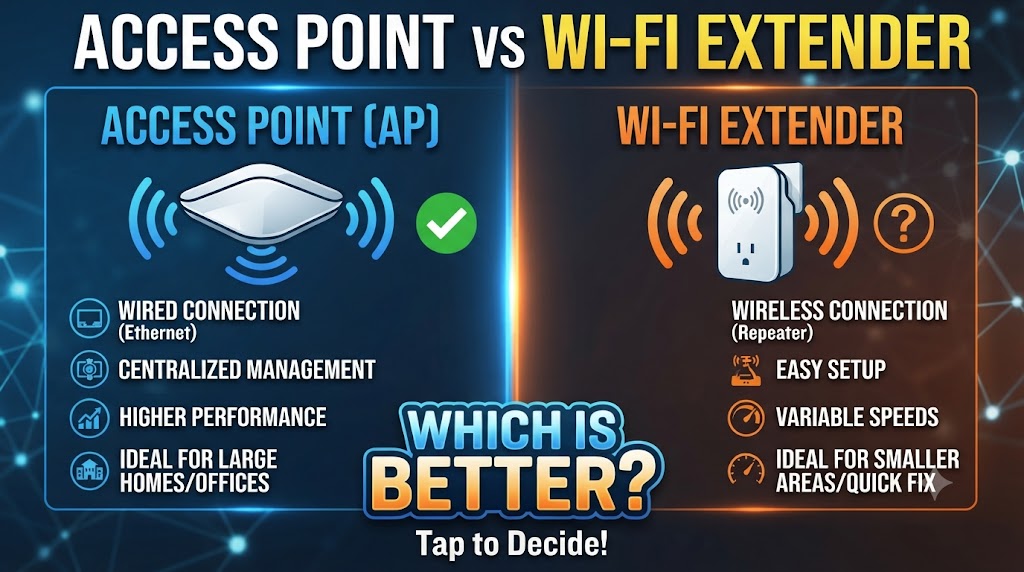
When a Wi-Fi signal does not reach every part of a home, office, shop, or other building, an Access Point vs Wi-Fi Extender comparison can help you understand which solution fits your network. Both devices can improve Wi-Fi coverage, but they work in different ways. An access point normally creates a Wi-Fi network from a wired network connection, while a Wi-Fi extender receives an existing wireless signal and extends its coverage.
The right choice depends on your existing network, available cabling, required performance, and the area you want to cover. An access point can be useful when Ethernet cabling is available and you want a dedicated wireless connection. A Wi-Fi extender can be more convenient when running a network cable is difficult. Let’s compare them feature by feature.
Quick Comparison Table
| Feature | Access Point | Wi-Fi Extender |
|---|---|---|
| Main purpose | Creates Wi-Fi from a wired network | Extends an existing Wi-Fi signal |
| Connection to router | Usually Ethernet cable | Usually wireless |
| Wi-Fi coverage | Adds a new coverage area | Extends existing coverage |
| Performance | Generally more consistent | Can vary with signal quality |
| Speed | Usually better with wired backhaul | Can be reduced by wireless backhaul |
| Installation | Requires cable in most setups | Usually easier |
| Flexibility | Excellent for planned networks | Convenient for quick coverage expansion |
| Best for | Homes, offices, shops, larger networks | Small coverage gaps |
| Wired backhaul | Yes | Some models support it |
| Setup difficulty | Moderate | Usually simple |
What Is an Access Point?
An Access Point (AP) is a networking device that provides Wi-Fi access to devices such as smartphones, laptops, smart TVs, cameras, and tablets.
In a typical setup, the access point connects to a router, switch, or other network device through an Ethernet cable. It then provides wireless connectivity in the area where it is installed.
For example, if a router is installed at one end of an office and the Wi-Fi signal is weak at the other end, you can connect an access point to the network using Ethernet and install it in the weaker area.
How Does an Access Point Work?
The basic connection looks like this:
Router/Switch → Ethernet Cable → Access Point → Wi-Fi Devices
Because the access point uses a wired network connection, it does not need to depend on a weak Wi-Fi signal from the main router to provide wireless coverage.
Advantages of an Access Point
- Uses a wired network connection.
- Can provide more consistent performance.
- Suitable for larger areas.
- Useful for offices, shops, schools, and larger homes.
- Multiple access points can be used in a larger network.
- Can support many wireless devices, depending on the model and network design.
What Is a Wi-Fi Extender?
A Wi-Fi Extender, also called a range extender, is designed to increase the coverage of an existing wireless network.
Instead of connecting to the router through Ethernet, the extender normally communicates with the router wirelessly. It receives the existing Wi-Fi signal and retransmits it toward an area with weak coverage.
The basic setup looks like this:
Router → Wi-Fi → Extender → Wi-Fi Devices
Therefore, the extender should normally be installed where it can still receive a reasonably good signal from the main router.
How Does a Wi-Fi Extender Work?
Suppose your router provides good Wi-Fi in the living room but the signal becomes weak in a nearby bedroom.
You can place the extender between the router and the weak area. The extender receives the router’s wireless signal and provides coverage farther away.
However, placing an extender in an area where the original Wi-Fi signal is already extremely weak may not provide the expected improvement.
Access Point vs Wi-Fi Extender: Main Differences
1. Connection Method
The biggest difference between an access point and a Wi-Fi extender is how they connect to the existing network.
An access point normally uses an Ethernet cable for its network connection. A Wi-Fi extender normally uses a wireless connection to communicate with the router.
Winner: Depends
If Ethernet cabling is available, an access point can be more suitable. If you cannot easily run a cable, an extender can be more convenient.
2. Performance
An access point with a wired connection does not have to use Wi-Fi to receive its network connection from the router. This can make its connection more consistent.
A wireless extender, however, depends on the wireless link between the router and extender. Walls, distance, interference, and network conditions can affect that connection.
Winner: Access Point for setups where a wired connection is available and performance consistency is important.
3. Coverage
Both devices can increase Wi-Fi coverage, but they do it differently.
An access point creates Wi-Fi coverage from a location connected to the wired network. This makes it useful for extending coverage to another floor, room, office area, or building section when cabling is possible.
An extender expands an existing wireless network and can be useful for smaller coverage gaps.
Winner: Depends on the building and network layout.
4. Speed
An access point connected through Ethernet can generally provide a stronger network foundation because the connection back to the router or switch is wired.
With a wireless extender, the available performance depends partly on the wireless connection between the extender and the main router.
Also, the actual speed depends on the Wi-Fi standard, Ethernet connection, hardware, distance, interference, and internet connection.
Winner: Access Point when both solutions are otherwise comparable and the access point has a suitable wired backhaul.
5. Installation
A Wi-Fi extender is usually easier to install. You typically plug it in, connect it to the existing Wi-Fi network, and position it appropriately.
An access point generally requires an Ethernet cable and may require more network configuration.
Winner: Wi-Fi Extender
6. Network Expansion
Access points are particularly useful when you want to build a more structured wireless network.
For example, an office may use several access points connected to network switches to provide Wi-Fi across different areas.
Extenders can also increase coverage, but they are generally more suited to filling smaller wireless coverage gaps.
Winner: Access Point for structured network expansion.
7. Reliability
An access point with Ethernet backhaul can avoid some of the problems associated with using Wi-Fi as the connection between the router and the coverage device.
A Wi-Fi extender depends more heavily on the quality of the wireless signal it receives.
Winner: Access Point when a proper wired connection is available.
Access Point vs Wi-Fi Extender for Home Use
For a normal home, either option can work.
A Wi-Fi extender may be appropriate when:
- You have a small coverage problem.
- Running Ethernet cable is difficult.
- You want a simple installation.
- The router and weak area are relatively close.
An access point may be more appropriate when:
- Ethernet cable is already available.
- You want stronger and more consistent network connectivity.
- You are covering multiple rooms or floors.
- You have a larger home.
- You are planning a more structured network.
Access Point vs Wi-Fi Extender for Office Use
For offices, access points are often useful because they can be connected to the wired network infrastructure.
A larger office may have several Ethernet connections and network switches. In such an environment, installing access points in appropriate locations can provide Wi-Fi coverage across different areas.
An extender can still be useful for a small office or a particular area where installing Ethernet is impractical.
Which Is Better for CCTV Cameras?
The choice also depends on the type of CCTV system.
For an IP camera that needs reliable network connectivity, a wired network connection can be advantageous. An access point can provide Wi-Fi connectivity in an area where Ethernet is available.
However, for cameras that are specifically designed for wireless connectivity, a Wi-Fi extender may sometimes help improve coverage.
For security cameras, network stability is particularly important because an unreliable wireless connection can affect live viewing or remote access.
Which Is Easier to Set Up?
If simplicity is your main concern, a Wi-Fi extender generally has an advantage.
An extender can often be configured without installing new Ethernet cable. However, correct placement is important.
An access point requires a network cable in a typical installation, but once the cable infrastructure is available, it can be a strong option for expanding a network.
Which One Should You Choose?
The answer depends mainly on your situation:
Choose an Access Point if:
- You can run an Ethernet cable.
- You need consistent Wi-Fi performance.
- You want to cover a larger area.
- You are expanding an office or business network.
- You want a more structured network setup.
Choose a Wi-Fi Extender if:
- You have a small Wi-Fi dead zone.
- Running Ethernet is difficult.
- You want an easier installation.
- You need a relatively simple coverage solution.
- Your existing router’s Wi-Fi signal is still reasonably strong at the extender’s installation point.
Access Point vs Wi-Fi Extender: Overall Result
There is no universal winner because the two devices solve the coverage problem in different ways.
Access Point: Better suited to situations where Ethernet cabling is available and consistent network performance is important.
Wi-Fi Extender: Better suited to situations where you need a simple way to improve coverage without running a network cable.
So, for a planned and performance-focused network, an access point is generally the more suitable option. For a quick and simple coverage improvement, a Wi-Fi extender can be more practical.
Conclusion
An access point and Wi-Fi extender are not exactly the same type of networking solution. An access point normally uses a wired network connection to provide Wi-Fi in another location, while an extender normally uses an existing Wi-Fi connection to expand wireless coverage.
If you already have Ethernet cabling or can install it, an access point can provide a strong foundation for expanding Wi-Fi coverage. If installing a cable is difficult and you only need to solve a limited coverage problem, a Wi-Fi extender may be the simpler choice.
Disclaimer
Disclaimer: Wi-Fi performance, coverage, speed, and compatibility can vary depending on the router, access point or extender model, Wi-Fi standard, building structure, distance, interference, Ethernet connection, and number of connected devices. Product specifications and features can also change over time. Check the manufacturer’s latest specifications before purchasing.