UPS vs Inverter for Computer Backup
Introduction
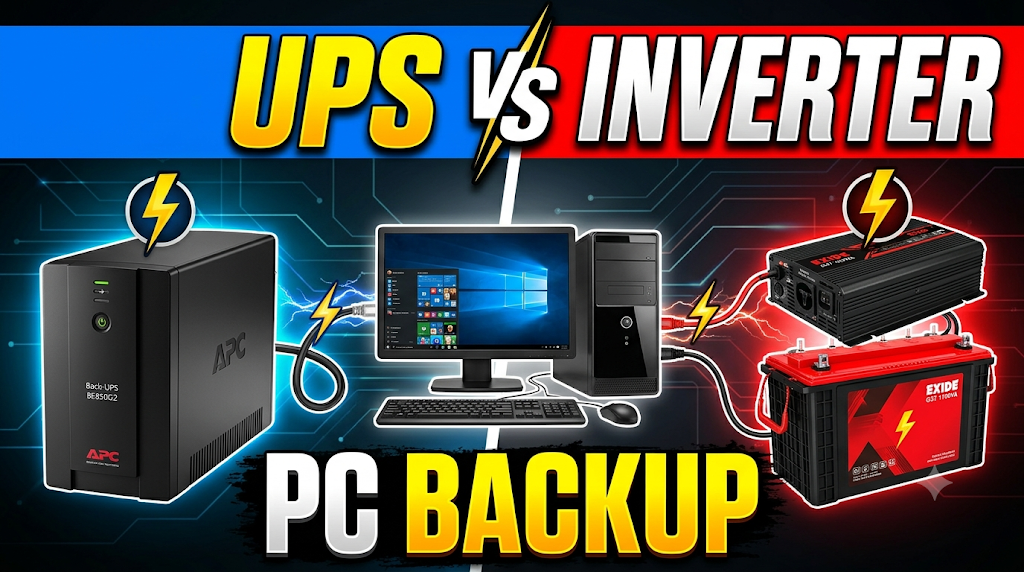
A UPS and a home inverter are both used to provide electricity during power cuts, but they are designed for different backup requirements. A UPS (Uninterruptible Power Supply) provides quick power backup to connected electronic devices when the main electricity supply fails. A home inverter generally supplies backup electricity to multiple household appliances, including computers, fans, lights and televisions. Although both systems can operate a computer, their switching time, power protection, battery capacity and backup duration are different.
Choosing the right option is important because an unexpected power interruption can shut down a computer, interrupt ongoing work and cause unsaved data loss. A UPS is generally preferred for desktop computers because it provides fast backup switching and additional power protection. A home inverter can be useful when longer backup is required, particularly when a computer needs to operate alongside other household appliances. Understanding their differences helps users choose a suitable backup solution for home, office and computer lab use.
Quick Comparison Table
| Feature | UPS | Home Inverter |
|---|---|---|
| Main purpose | Computer and electronic equipment backup | Household electricity backup |
| Switching time | Very fast, model-dependent | Generally slower |
| Power interruption | Designed to minimise interruption | May interrupt computer power during changeover |
| Voltage protection | Usually includes surge protection and voltage regulation | Depends on inverter model |
| Battery | Usually built-in or supported external battery | Usually external battery |
| Backup duration | Generally shorter | Generally longer |
| Power capacity | Usually designed for selected equipment | Can support multiple appliances |
| Installation | Usually plug-and-play | Requires battery and electrical connections |
| Portability | Compact models available | Generally larger installation |
| Maintenance | Depends on battery type | Depends on battery type |
| Cost | Generally affordable for individual computers | Higher complete setup cost for longer backup |
| Best use | Computer protection and safe shutdown | Longer household backup |
1. Working Principle
UPS for Computer Backup
A UPS stores electrical energy in a battery and provides backup power when the main electricity supply fails.
Depending on its design, a UPS may use standby, line-interactive or online double-conversion technology. It detects a power interruption and supplies electricity from its battery through an inverter circuit.
An online UPS continuously supplies power through its inverter, while standby and line-interactive models switch to battery operation when required.
Home Inverter for Computer Backup
A home inverter converts DC electricity stored in an external battery into AC electricity for household appliances.
When electricity is available, the inverter charges the battery and supplies power to connected loads. During a power cut, an internal changeover mechanism switches the connected appliances to battery power.
The inverter can operate a computer, but its suitability depends on switching time, output waveform and voltage regulation.
Winner: UPS. It is specifically designed to provide uninterrupted or near-uninterrupted backup to sensitive electronic equipment.
2. Switching Time
UPS
A UPS generally switches to battery power very quickly when the main electricity supply fails.
Standby and line-interactive UPS models have a short transfer time, while online double-conversion UPS models provide zero transfer time because their inverter continuously supplies the connected equipment.
This helps prevent unexpected computer shutdowns during power cuts.
Home Inverter
A home inverter usually takes longer to switch from mains electricity to battery power.
During this changeover, the computer may experience a brief interruption. Depending on the computer’s power supply and the inverter’s transfer time, this can cause a restart or shutdown.
Winner: UPS. Its faster switching makes it more suitable for protecting computers against sudden power interruptions.
3. Computer Protection and Voltage Regulation
UPS
A quality UPS can provide several forms of power protection, including surge suppression, voltage regulation and battery backup.
Line-interactive models commonly include Automatic Voltage Regulation (AVR), which corrects certain voltage fluctuations without unnecessarily switching to battery mode.
Online UPS systems provide additional protection through double conversion, which helps isolate connected equipment from many input power disturbances.
Home Inverter
A home inverter provides backup electricity, but its voltage regulation and protection features vary by model.
Some modern inverters provide pure sine-wave output and voltage regulation, while basic models may offer fewer protection features.
An inverter should be selected according to the computer’s power supply requirements.
Winner: UPS. It generally offers more dedicated protection features for sensitive computer equipment.
4. Backup Duration
UPS
A standard desktop UPS generally provides a limited backup period.
Its runtime depends on battery capacity, computer power consumption, battery condition and connected load.
For many users, the purpose is to save work, close applications and shut down the computer safely rather than continue working for several hours.
Some UPS models support external battery packs for longer backup.
Home Inverter
A home inverter generally supports larger external batteries.
This makes it possible to operate a desktop computer for longer periods, depending on battery capacity and the total connected load.
It can also supply backup electricity to other appliances connected to the inverter.
Winner: Home Inverter. It generally offers longer backup when equipped with a suitably sized battery.
5. Battery Capacity and Expansion
UPS
Most desktop UPS models include a relatively small internal battery.
Some advanced models support external battery modules, but expansion options depend on the specific UPS design.
Users should check the manufacturer’s supported battery capacity and replacement requirements before purchasing.
Home Inverter
Home inverters commonly use external batteries, including tubular and other compatible deep-cycle models.
Battery capacity can be selected according to the required backup duration and inverter specifications.
This makes home inverters suitable for users who need longer computer backup.
Winner: Home Inverter. It generally offers more flexibility for installing larger battery capacity.
6. Output Waveform
UPS
UPS output waveforms vary by model.
Some budget UPS units provide simulated or stepped sine-wave output, while better models provide pure sine-wave output.
A pure sine-wave UPS is a suitable choice for users who want better compatibility with modern computer power supplies, particularly models with active Power Factor Correction (PFC).
Home Inverter
Home inverters are available with pure sine-wave and modified sine-wave output.
A pure sine-wave inverter is generally recommended for desktop computers because it provides an AC waveform closer to normal utility electricity.
Users should check the computer power supply manufacturer’s requirements before connecting it to an inverter.
Winner: Tie. Both UPS and home inverters can provide pure sine-wave output when the correct model is selected.
7. Installation and Convenience
UPS
A desktop UPS is generally easy to install.
Users connect the UPS to a wall socket and plug the computer and other supported equipment into its output sockets.
Most small UPS models do not require complicated household wiring.
Home Inverter
A home inverter requires an appropriate battery, electrical connections and suitable installation arrangements.
If the inverter is already installed in the home, connecting a computer to a properly designed backup circuit can be convenient.
However, a new inverter installation generally requires more planning than installing a desktop UPS.
Winner: UPS. It is generally easier to install and use for an individual computer.
8. Initial Cost and Maintenance
UPS
A small desktop UPS is generally an affordable solution for protecting one computer.
Its battery eventually needs replacement, and the replacement cost depends on the model and battery type.
Some advanced UPS systems cost considerably more because they offer additional protection and longer backup options.
Home Inverter
A home inverter setup generally requires an inverter and one or more external batteries.
The initial investment can be higher, particularly when the system is installed only for computer backup.
Battery maintenance depends on the type of battery selected. Flooded lead-acid batteries require more attention than sealed batteries.
Winner: UPS. It is generally more economical for basic backup of one computer, while an inverter may offer better value when multiple household appliances also need backup.
9. Power Capacity and Connected Devices
UPS
A desktop UPS is normally designed to support a computer and selected accessories such as a monitor and router.
The total connected load must remain within its watt and VA ratings.
Connecting high-power devices beyond its capacity can overload the UPS and reduce backup time.
Home Inverter
A home inverter can supply electricity to several appliances, depending on its rated capacity and available battery energy.
A computer can share backup power with fans, lights, routers and other compatible appliances.
However, increasing the connected load reduces the available backup duration.
Winner: Home Inverter. It is generally more suitable for supporting multiple household appliances along with a computer.
10. Best Applications
UPS for Computer Backup
A UPS is suitable for:
- Desktop computers and monitors.
- Office computers and workstations.
- Computer labs and educational institutions.
- Computers used for important work.
- Network equipment and routers.
- Systems requiring safe shutdown during power cuts.
Home Inverter for Computer Backup
A home inverter is suitable for:
- Homes requiring longer electricity backup.
- Computers used alongside fans and lights.
- Small offices with multiple appliances.
- Computer setups where a larger external battery is required.
- Homes with an existing inverter installation.
Winner: Depends. A UPS is better for dedicated computer protection, while a home inverter is more suitable for longer backup and multiple household appliances.
UPS vs Inverter for Computer Backup: Final Verdict
Both UPS and home inverters can provide backup electricity to computers, but they serve different purposes.
A UPS is generally the better choice for desktop computer protection because it provides fast switching, voltage regulation and protection against certain electrical disturbances. It is particularly useful for offices, computer labs and users who need enough time to save their work and shut down safely.
A home inverter is generally better when longer backup is required. It can operate a computer along with other household appliances and supports larger external batteries.
For the best protection, a computer can be connected through a suitable UPS that is itself supplied by a compatible home inverter system. The UPS helps manage the short power interruption during inverter changeover.
Overall Winner for Computer Protection: UPS.
Winner for Longer Backup: Home Inverter.
Best Combined Setup: UPS + Home Inverter, when both systems are correctly sized and compatible.
Frequently Asked Questions (FAQs)
1. Which is better for a desktop computer, UPS or inverter?
A UPS is generally better because it provides faster switching and dedicated power protection. A home inverter is useful when longer backup is required.
2. Can I run a computer directly on a home inverter?
Yes. A computer can operate on a home inverter if the inverter provides a compatible output waveform, suitable voltage and sufficient power capacity.
3. Why does a computer restart when electricity changes to inverter backup?
A computer may restart if the inverter’s changeover time is longer than the computer power supply can tolerate. A suitable UPS between the computer and inverter can help prevent this problem.
4. Can I connect a UPS to a home inverter?
Yes. A compatible UPS can be connected to a home inverter supply. However, the inverter waveform, voltage, frequency and UPS input specifications must be compatible.
5. Which provides longer backup, UPS or inverter?
A home inverter generally provides longer backup because it can use larger external batteries. A standard desktop UPS usually provides shorter backup.
6. Is a pure sine-wave inverter necessary for a computer?
A pure sine-wave inverter is generally recommended for better compatibility with modern computer power supplies. Always check the computer power supply specifications.
7. Can I connect a monitor and CPU to the same UPS?
Yes, provided their combined power consumption stays within the UPS’s rated watt and VA capacity. The monitor also reduces the available backup duration.
Disclaimer
This comparison is based on general characteristics of desktop UPS systems and home inverters. Actual switching time, output waveform, voltage regulation, battery backup and power protection vary by model and manufacturer. Always check the computer power supply requirements and UPS or inverter specifications before installation.