USB-C Charger vs USB-A Charger
A USB-C charger vs USB-A charger comparison is useful when choosing a charger for modern smartphones, tablets, laptops, earbuds, and other electronic devices. USB-C and USB-A are different connector types, but the charging performance depends on more than the connector alone. Charger power, charging standards, cable compatibility, and the device being charged all affect the final result.
In this USB-C charger vs USB-A charger comparison, we will compare connector design, charging speed, power delivery, compatibility, convenience, cable requirements, and everyday use. This makes it easier to understand which charger is better for your current devices and future upgrades.
Quick Comparison Table
| Feature | USB-C Charger | USB-A Charger |
|---|---|---|
| Connector type | USB-C | USB-A |
| Connector design | Reversible | Not reversible |
| Charging capability | Can support modern high-power standards | Can support charging, depending on standard |
| Fast charging | Widely supported on newer chargers | Available on some chargers |
| USB Power Delivery | Commonly supported | Not typically associated with modern USB PD charging |
| Device compatibility | Common on newer devices | Common on older and existing accessories |
| Laptop charging | Supported by many USB-C chargers | Generally less suitable |
| Cable connection | USB-C cable required for USB-C output | USB-A cable required for USB-A output |
| Portability | Often compact in modern chargers | Also widely available |
| Best for | Newer devices and high-power charging | Older USB accessories and existing cables |
USB-C Charger vs USB-A Charger: Main Difference
The main difference is the connector and the charging technologies commonly associated with each port.
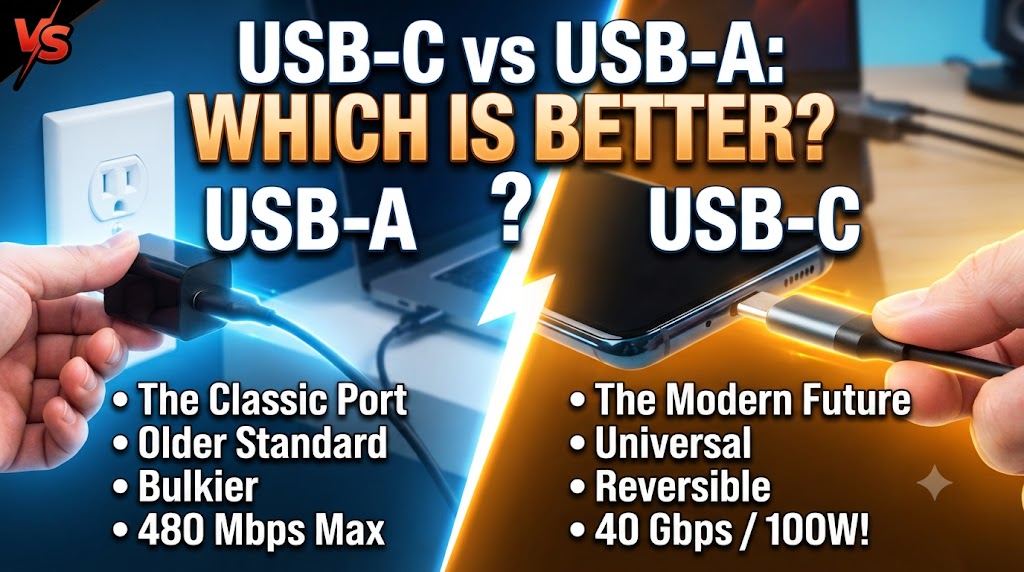
USB-C is a newer, reversible connector that has become common across smartphones, tablets, laptops, headphones, gaming devices, and other electronics. Depending on the charger and device, USB-C can support high-power charging and USB Power Delivery.
USB-A is the older rectangular USB connector. It remains widely used, especially with older charging cables, accessories, computers, and existing chargers.
Winner: USB-C for modern devices and flexibility.
However, USB-A can still be useful if your existing cables and accessories use USB-A.
Connector Design
USB-C has a small, oval-shaped connector that can be inserted in either orientation.
This makes it more convenient because you do not need to check which side of the connector is facing upward.
USB-A uses a rectangular connector with a specific orientation. You generally need to position the plug correctly before inserting it.
Winner: USB-C.
Charging Speed
Charging speed depends on the charger’s power output, charging protocol, cable, and the device being charged.
USB-C chargers are commonly available with modern fast-charging technologies. USB Power Delivery, for example, can support a wide range of power levels depending on the charger and device.
USB-A chargers can also support fast charging with compatible technologies. Therefore, simply seeing USB-A or USB-C does not automatically tell you the charging speed.
For the best result, check the charger’s wattage and supported charging standards rather than judging it only by the port type.
Winner: USB-C for modern fast-charging compatibility.
Power Delivery
USB Power Delivery, commonly called USB PD, is an important reason USB-C has become popular for charging.
USB-C chargers can support USB PD at different power levels. This allows compatible chargers to supply power to devices ranging from small accessories to smartphones, tablets, and some laptops.
USB-A chargers can provide power as well, but modern high-power USB PD charging is primarily associated with USB-C.
Winner: USB-C.
Laptop Charging
USB-C is particularly useful for devices that support USB-C charging.
Many modern laptops can charge through USB-C, although the required power varies by model. Some laptops may require a higher-wattage charger than smartphones or tablets.
USB-A charging is generally not the preferred solution for modern laptop charging because the port and commonly associated charging standards are less suited to the higher power requirements of many laptops.
Winner: USB-C.
Smartphone and Tablet Compatibility
Many newer smartphones and tablets use USB-C for charging.
A USB-C charger can therefore connect directly to a device using an appropriate USB-C cable. Some devices may support additional fast-charging standards that require specific charger and cable combinations.
Older devices may still use other connectors, so compatibility should always be checked before buying.
Winner: USB-C for newer smartphones and tablets.
Cable Compatibility
The charger port is only one part of the charging system.
A USB-C charger may require a USB-C-to-USB-C cable for devices with USB-C charging ports. USB-A chargers commonly use USB-A-to-USB-C or USB-A-to-other-connector cables, depending on the device.
Cable capability also matters. A cable may have limits on power delivery or data transfer, so using a suitable cable is important when taking advantage of higher charging speeds.
Winner: Depends on your existing devices and cables.
Convenience
USB-C is generally more convenient because its connector is reversible.
It is also increasingly common across different types of devices. This can reduce the need to carry separate chargers for every device.
USB-A can still be convenient if you already own many USB-A cables and accessories.
Winner: USB-C.
Port Availability
USB-A remains common on older computers, chargers, hubs, and other accessories.
USB-C is becoming increasingly common on newer electronics. Some modern chargers include multiple USB-C ports, while others combine USB-C and USB-A to support both newer and older accessories.
If you have a mixture of devices, a charger with both port types can sometimes be more practical.
Winner: Depends on your devices.
Size and Portability
The physical size of the charger depends more on its design and power output than simply whether it has USB-C or USB-A.
Modern USB-C chargers are available in compact designs, including models using newer power electronics that allow relatively high power in a small package.
USB-A chargers are also available in compact designs.
Winner: Tie.
Which Is Better for Travel?
For travel, USB-C can be the more convenient choice if most of your devices support USB-C charging.
One USB-C charger with multiple ports can potentially charge a smartphone, tablet, earbuds, or compatible laptop, depending on its power output and port configuration.
However, USB-A can still be useful when travelling with older accessories that use USB-A cables.
Winner: USB-C for newer devices; USB-A if your accessories still rely heavily on USB-A.
USB-C Charger vs USB-A Charger: Which Is Better for You?
Choose a USB-C charger if:
- You use newer smartphones or tablets.
- Your devices support USB-C charging.
- You want modern fast-charging options.
- You need to charge a compatible laptop.
- You prefer a reversible connector.
- You want a charger that is better suited to newer devices.
Choose a USB-A charger if:
- You already have several USB-A cables.
- Your accessories primarily use USB-A cables.
- You have older devices that work well with USB-A charging.
- You do not need the newer USB-C charging features.
USB-C Charger vs USB-A Charger: Which Should You Buy?
For most people buying a new charger today, USB-C is the better long-term choice.
It offers a reversible connector and is widely used with newer devices. It also provides access to modern charging technologies such as USB Power Delivery when supported by the charger, cable, and device.
However, USB-A has not suddenly become useless. If your existing accessories depend on USB-A, keeping a USB-A charger or choosing a charger with both USB-C and USB-A ports can make sense.
Final Verdict
In the USB-C charger vs USB-A charger comparison, USB-C is the better choice for most new purchases, particularly if you use modern smartphones, tablets, or compatible laptops.
USB-A remains useful for older devices and existing cables. Therefore, the best charger ultimately depends on the devices you own and the charging standards they support.
If you are building a new charging setup, USB-C offers better compatibility with the direction of modern device charging. If you already have many USB-A accessories, a multi-port charger supporting both types may provide the most practical solution.
Disclaimer
Charging speed, power output, compatibility, and supported charging standards can vary by charger, cable, device, and manufacturer. Always check the specifications of your device, charger, and cable before using high-power or fast-charging features.